What Is an Antidetect Browser
An antidetect browser is designed to create isolated browser profiles that look separate to websites. Compared with a regular browser, it gives users more control over what each profile exposes, so one browsing environment does not easily overlap with another.
In simple terms, a normal browser opens the door with the same set of signals every time. An antidetect browser gives you a way to keep different browsing identities apart, so each profile can behave like its own environment.
This is useful when you need to **manage multiple accounts **without making them look tied to the same device or browser setup.
Why Browser Fingerprints Matter
Browser fingerprint is the collection of signals a website can use to recognize a browser or device. These signals can include:
- User agent and browser version
- Screen resolution and color depth
- Installed fonts
- WebGL and Canvas rendering data
- Timezone and language settings
- Browser extensions and plugins
A proxy or VPN can change your IP address, but that does not fully hide the browser fingerprint. Residential proxy alone is only one piece of the setup. It hides your location, while the browser still looks familiar enough for platforms to connect accounts. It works best when paired with browser profile isolation rather than used on its own.
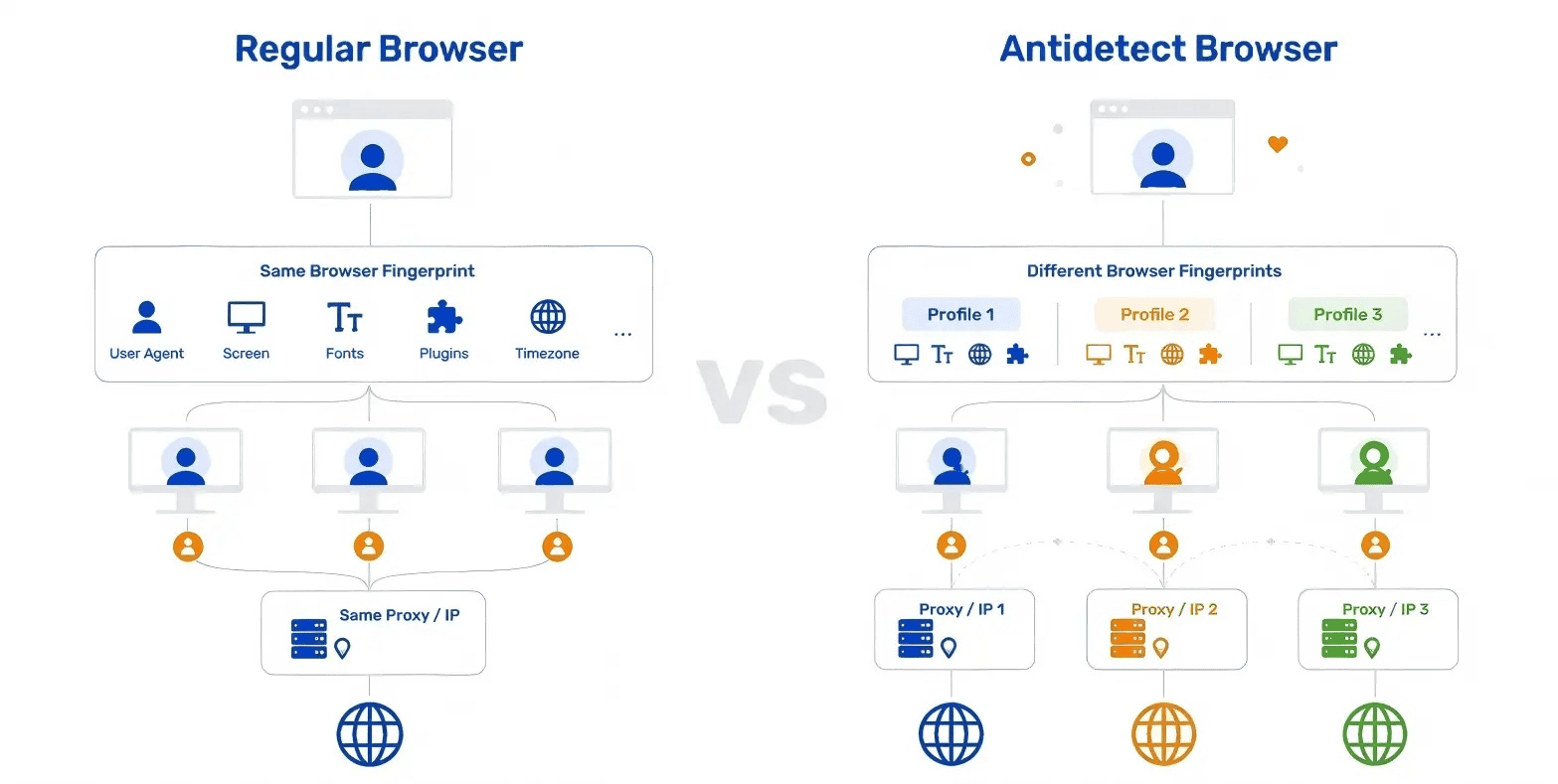
How Antidetect Browsers Work
The main idea behind an antidetect browser is profile isolation. In practice, that means each browser profile behaves like its own separate device, with its own cookies, storage, proxy, and fingerprint settings. For example, you might use one profile for a TikTok account, another for an Amazon store, and a third for web scraping, and keep all three completely separate.
An antidetect browser also lets you control the browser signals that websites can see. These include things like Canvas, WebGL, fonts, User Agent, timezone, and language settings. If those details are consistent, each profile looks like a normal, believable browser environment rather than a random mix of settings.
The last piece is proxy binding. Each profile should connect through its own proxy, so one account does not share the same IP as another. In simple terms, it is like giving every profile its own browser, its own login data, and its own internet address.
These layers work together to keep profiles from overlapping. So when you switch between them, it feels less like opening multiple tabs in one browser and more like moving between separate computers.
Common Use Cases for Antidetect Browsers
Different teams use antidetect browsers for different reasons in different ways, depending on how many accounts they manage and how much separation they need.
| Use case | Why it matters |
|---|
| Affiliate marketing | Manage multiple accounts across platforms without triggering duplicate account flags |
| Social media management | Keep separate client environments isolated on platforms (TikTok, Instagram, and Facebook) |
| E-commerce | Organize different storefronts or ad accounts on platforms like Amazon, eBay, or Shopify |
| Web scraping | Combines browser isolation with proxy to reduce blocking during data collection |
| Ad verification | View results from different environments without being treated as a single traffic source |
| Market research | Check platform behavior across multiple locations or browsing identities |
The tool you pick depends on which use case fits your workflow. Some need heavy automation. Others just need clean profiles that don't get flagged.
How to Choose an Antidetect Browser
You now understand why browser fingerprints matter and why proxies alone cannot fully separate online identities. The next step is choosing an antidetect browser that can support your workflow reliably over time.
Browser fingerprint quality
A good antidetect browser should do more than change a few settings. The important part is whether its fingerprint signals stay internally consistent, so the browser looks like a real, normal environment instead of a patched-together one. It should also reduce the risk of exposing real signals through WebRTC, DNS, or other leaks, and perform well on mainstream fingerprint tests such as BrowserScan.
Browser profile isolation
Every account should live in its own browser environment. That means the browser should keep profiles, cookies, local storage, cache, sessions, and other browsing data fully separated, so activity from one account does not spill into another. For example, if you manage one profile for an ad account and another for an ecommerce store, neither profile should share login data or history.
Proxy integration
A proxy is not just about changing IPs. The browser environment and the proxy need to work together so each profile can stay tied to its own network identity, location, and browsing setup. A good antidetect browser should support mainstream proxy protocols and make it easy to assign one independent proxy per profile. Geonode is one example of a residential proxy provider that can be paired with separate browser profiles.
Ease of use
A powerful product should still be easy to start with. Creating a browser profile should be straightforward, the browser should be able to generate a reasonable fingerprint automatically, and new users should not need to spend a lot of time manually tuning every parameter before they can begin working.
Automation capabilities
A strong antidetect browser should adapt to **different workflows. **Some users only need simple automation, while others need deeper control for large-scale account management or custom browser operations, so the browser should support Local API, Playwright, Puppeteer, Selenium, or RPA in a flexible way.
Team collaboration
If the product is built for teams, it should make multi-user work safer and easier to manage. Look for features such as role permissions, browser profile sharing, operation logs, and team controls, so different members can work in the same workspace without creating unnecessary risk or confusion.
Browser updates
Browser kernels should stay up to date. If a browser version falls too far behind, fingerprint behavior can become less natural or less compatible with modern sites, which can make profiles easier to detect. A strong antidetect browser should keep **Chromium and Firefox kernels updated **regularly.
Security and privacy
Security should go beyond basic login protection. A reliable platform should have a broader security framework, ideally with standards such as SOC 2, ISO 27001, or ISO 27701, plus protections like encrypted profile storage, login safeguards, and IP allowlisting.
When evaluating antidetect browsers, look for products that provide consistent browser fingerprints, strong profile isolation, flexible proxy integration, regular browser updates, and practical automation support.
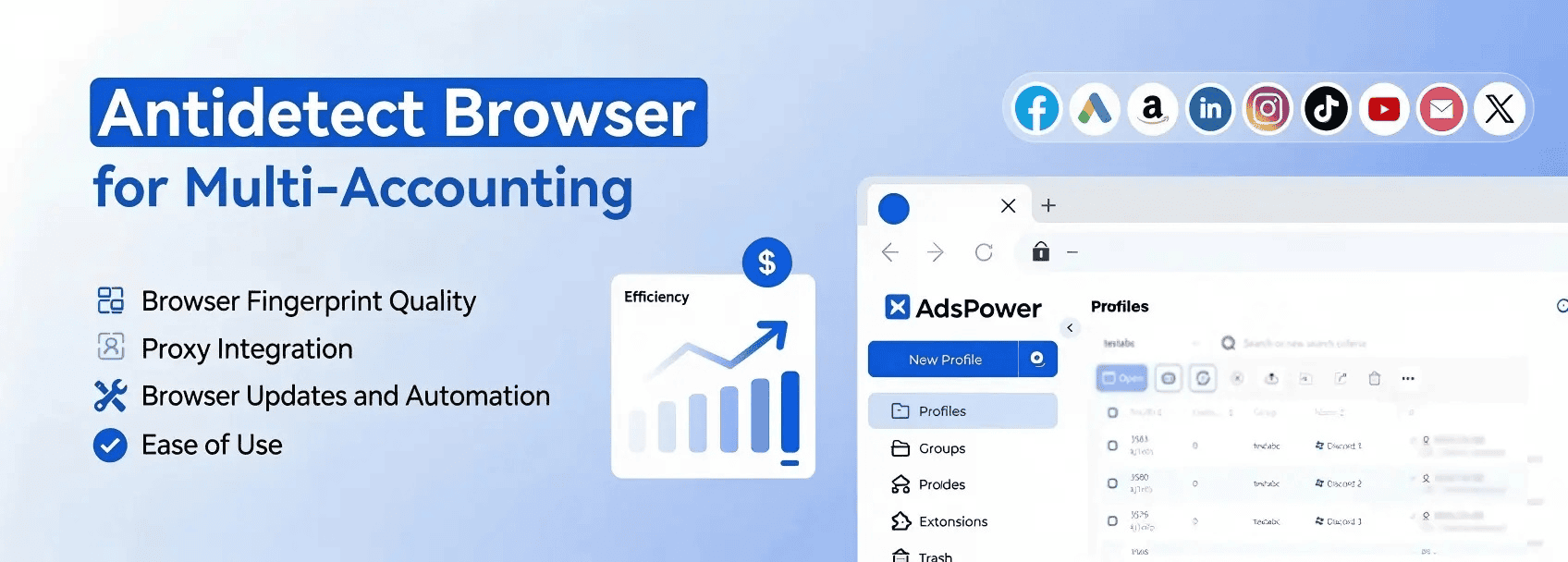
One antidetect browser that meets these criteria is AdsPower. It offers Chromium and Firefox browser options, isolated profiles, proxy support, automation through Local API, Playwright, Puppeteer, Selenium, and RPA, plus team collaboration and security features designed for multi-account workflows. For a closer look at how this antidetect browser performs in practice, see our in-depth AdsPower review.
Best Practices for Using an Antidetect Browser
Choosing the right browser is only the first step. How you configure and maintain your browser profiles also plays an important role in keeping accounts separated over time.
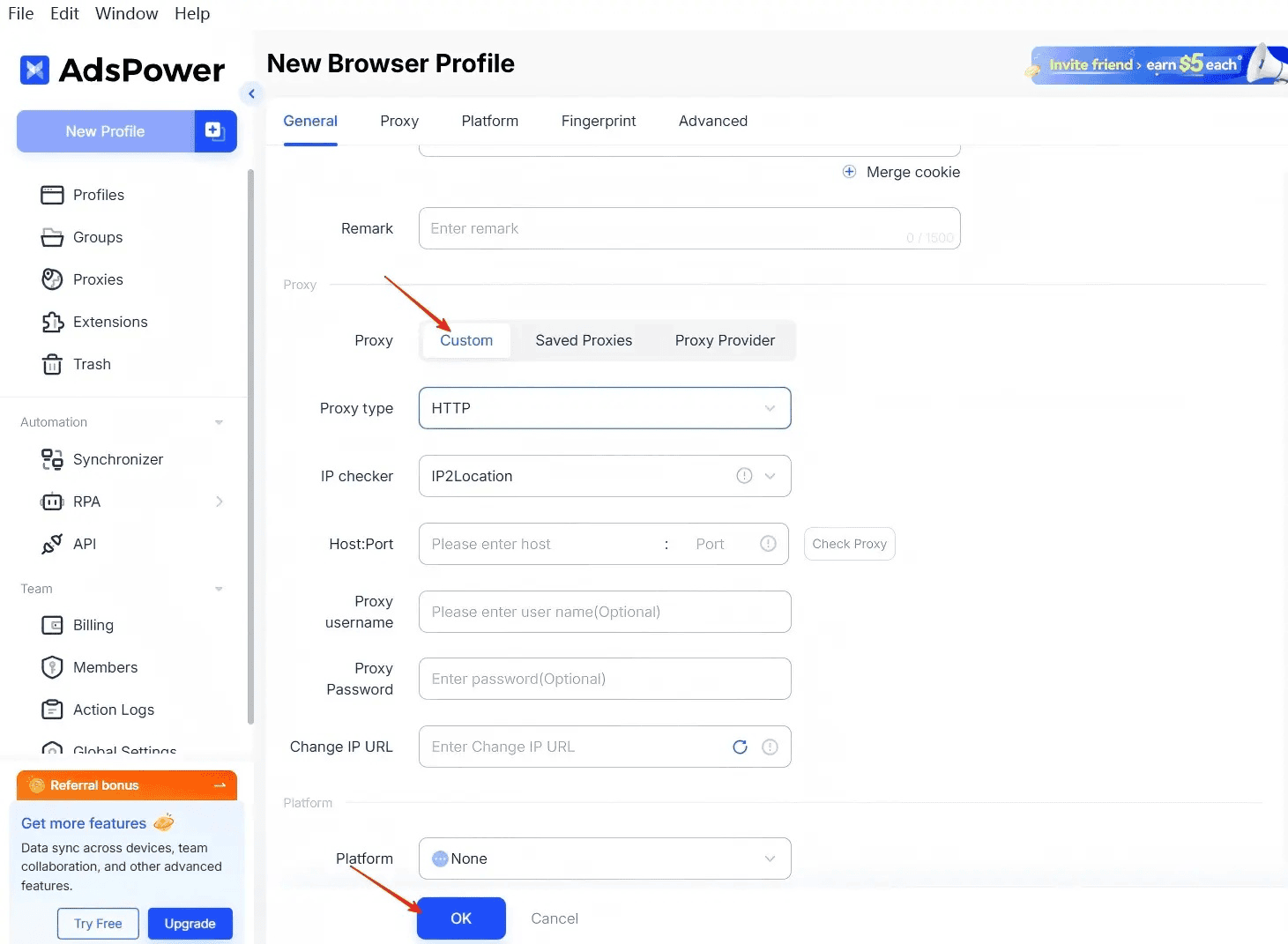
1. Create a profile and add a proxy
Start by creating a browser profile for one account or one project, then assign a dedicated proxy to that profile right away. This keeps the browser environment and network identity linked together, instead of letting multiple accounts share the same setup.
2. Match browser settings with the proxy location
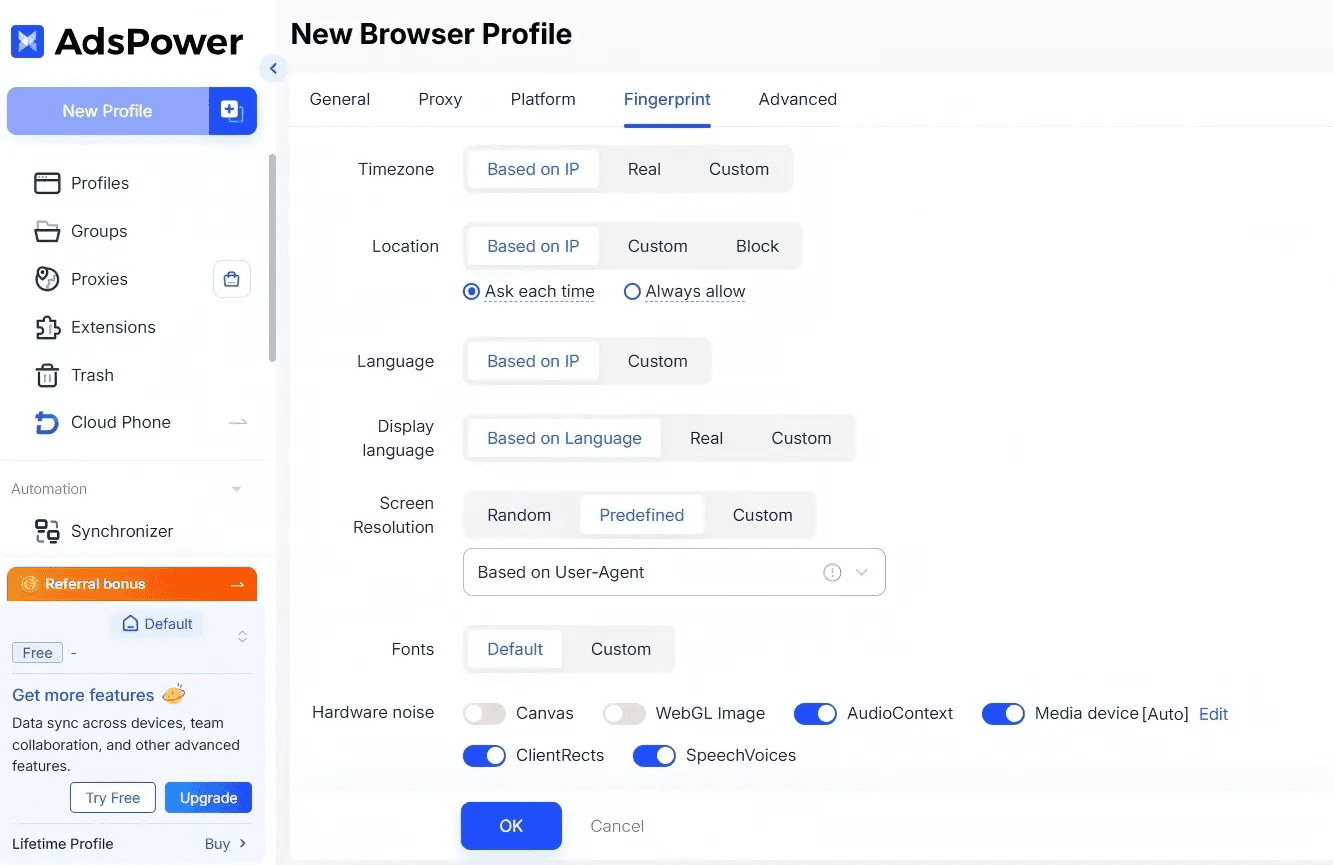
Timezone, location, and language settings should align with the location of your proxy. In AdsPower, these details can be matched more automatically based on the IP.
3. Keep fingerprints stable
Once a profile is created, avoid changing its fingerprint settings too often. A stable fingerprint generally looks more natural than one that keeps shifting.
4. Open and manage profiles consistently
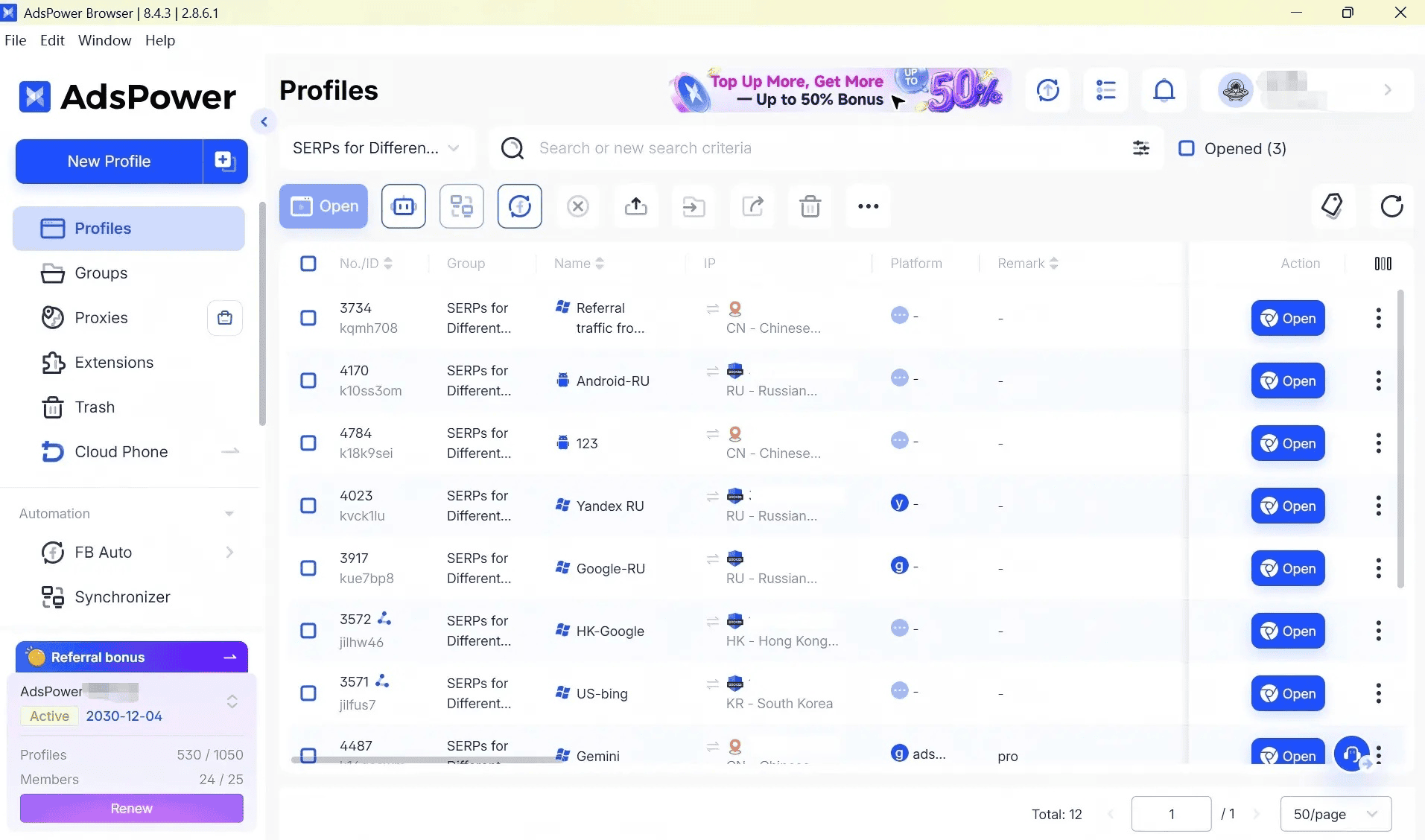
After setup, open the profile and use it like a normal browser window. From there, log in to the account, do the work you need, and keep that profile dedicated to the same identity. As the number of profiles grows, a clear naming system and organized profile list also make day-to-day management much easier.
5. Keep cookies separate
Do not mix cookies, cache, session data, or login history between profiles. Each profile should stay isolated so one account’s activity does not bleed into another.
6. Update the browser regularly
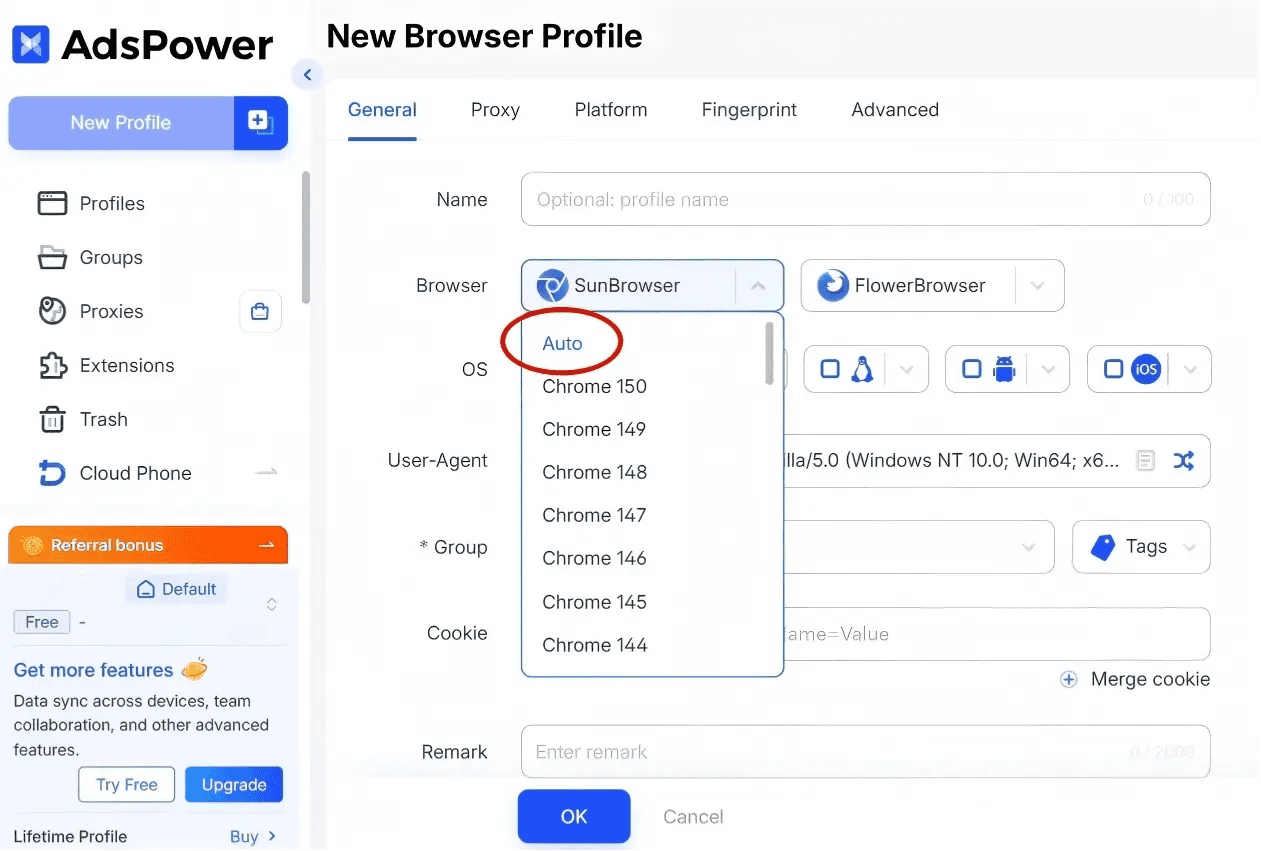
Regular browser updates help ensure better compatibility with modern websites and reduce the chances of using an outdated setup. AdsPower handles this automatically just leave the fingerprint version on "Auto".
Conclusion
An antidetect browser is only one part of a reliable multi-account setup. While the browser keeps each profile's fingerprint and local data separate, a residential proxy gives each profile its own stable IP. Together they form a practical foundation for multi-account work.
If you want to put this into practice, AdsPower handles the profile isolation side and GeoNode supplies the residential proxies. With 2 free permanent profiles from Adspower, and proxies starting at $0.79/GB from GeoNode, you can start with one profile, one proxy, and a quick fingerprint check, then scale once the workflow feels stable.