Best for 4chan
Residential proxies
from $0.27/GB
The IPs come from home ISPs in the country you pick, and a sticky session keeps one IP for up to 24 hours so a thread and its images load from one address.
4chan works on
Proxy and VPN rule
4chan's global rules say users may not post from proxies, VPNs or Tor exit nodes, and the FAQ says Tor exit nodes and open proxies are blocked when possible. The rule covers posting; reading the boards is not restricted by it.
Built-in proxy setting
None. 4chan is a website with no official app, so the proxy goes into the operating system, the browser or a proxy client app.
Ban or block
An individual ban redirects you to 4chan.org/banned when you try to post. ISP, IP range and country blocks stop posting with an error instead of the banned page, and evading a ban turns it into a permanent one under the global rules.
Pick the method by the device you read 4chan on; the proxy protocol matters less than where you set it.
| Name | Works In | Auth | Blocking Resistance | Best For | Where To Get |
|---|---|---|---|---|---|
| System proxy (Windows, macOS, iPhone Wi-Fi) | 4chan in Chrome, Edge and Safari, which follow the system proxy | Username and password (browser prompt on Windows, password toggle on macOS and iPhone) | Same as the IP behind it | Reading 4chan on a school, office or ISP network that blocks it | Geonode residential or ISP proxies |
| Browser extension (for example Proxy SwitchyOmega) | Only the browser it is installed in | HTTP or SOCKS5; username and password support depends on the extension | Same as the IP behind it | Sending only 4chan through the proxy while other sites go direct | Geonode residential proxies |
| Proxy client app (Android) | Chrome and third-party 4chan apps on Android; the client routes apps through a local VPN | SOCKS5 or HTTP with username and password | Same as the IP behind it | Phones on mobile data or Wi-Fi where 4chan does not load | Geonode residential proxies |
| Proxy in code (4chan read-only JSON API) | Scripts that read a.4cdn.org, 4chan's official read-only API | http://USERNAME:PASSWORD@host:port in the proxy URL | Not a factor within the API rules (see troubleshooting) | Research and monitoring of threads and catalogs. Use only the read-only API; the global rules ban scrapers and automated downloading scripts on the boards themselves. | Geonode residential or rotating datacenter proxies |
ISP, range and country blocks only stop posting, so for reading the things that matter are Cloudflare checks on page loads (4chan's pages are served through Cloudflare), the country the IP is in, and keeping one IP while a thread and its images load.
from $0.27/GB
The IPs come from home ISPs in the country you pick, and a sticky session keeps one IP for up to 24 hours so a thread and its images load from one address.
from $1.25/IP
One fixed IP that never changes, which suits long reading sessions or an office network where every visit should come from the same address.
from $0.14/GB
Fine for the JSON API. For page loads, hosting IPs are more likely to get a Cloudflare challenge than home IPs, so check a board before relying on one.
Free
Open proxies; see the proxy rule above.
Copy the proxy host (hostname or IP), port, username and password from your Geonode dashboard, then add them to the device or browser you open 4chan in.
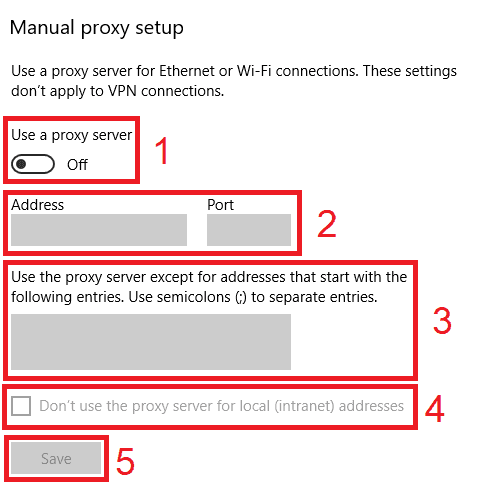
Open Settings > Network & internet > Proxy.
Under Manual proxy setup, click Set up next to Use a proxy server.
Turn on Use a proxy server.
Enter the host in Proxy IP address and the number in Port.
Click Save.
Open 4chan.org in Chrome or Edge and enter the proxy username and password when the browser asks.
If thumbnails or the post form break in Chrome, add 4chan.org under Settings > Privacy and security > Third-party cookies > Allowed to use third-party cookies. The 4chan FAQ asks for first and third party cookies.
Check detailed instructions on our blog:
Read the blog postOpen Geonode's What is my IP page in the same browser or on the same phone; it should show the proxy IP, not your own.
Open a board catalog on 4chan.org. If thumbnails load, images from the 4chan CDN are also coming through the proxy.
If you see a black and white '4chan.org' image in place of thumbnails, the proxy or an extension is stripping HTTP referers.
Windows: in Settings > Network & internet > Proxy, click Edit next to Use a proxy server and switch it off. macOS: switch off the proxy under Details > Proxies. iPhone: set Configure Proxy back to Off.
Android: tap Disconnect in the proxy client app. Browser extension: switch it to direct connection or disable it.