Best for AIO Bot
Residential proxies
from $0.27/GB
Residential IPs belong to home connections, and that is what Nike, Adidas and Footsites expect from a buyer. A Geonode sticky session keeps one IP on a task for up to 24 hours.
AIO Bot works on
Proxy type
Use residential proxies for checkout tasks and ISP proxies for monitor lists. Add them in Proxies > + Add New, one proxy per line.
When you need proxies
AIO Bot's product page says one account per site does not need a proxy, but proxies lower the ban risk. Once a store bans your IP, or you run several tasks, you need them.
Retailer rules
Nike's terms of sale (revised December 2025) let it cancel orders placed with automated ordering software and close accounts it suspects of resale. A proxy hides your IP. It does not stop a store from cancelling an order it ties to a bot.
AIO Bot reads proxies from named proxy lists. Most providers, including Geonode, export lists in the two formats below.
| Name | Works In | Auth | Blocking Resistance | Best For | Where To Get |
|---|---|---|---|---|---|
| Proxy list with login (IP:Port:Username:Password) | Proxies tab > + Add New, on Windows or a Windows VM | Username and password written into each line | Depends on the IP type (see below) | Checkout lists on a home PC or a VPS | Geonode residential, ISP or datacenter proxies |
| Proxy list with IP whitelisting (IP:Port) | Same Proxies tab, one IP:Port per line | The provider allows your PC's or server's IP, no password in the line | Depends on the IP type | Running the bot on a server with a fixed IP | Providers that offer IP whitelisting |
| No proxy (your own IP) | Any task without a proxy list | None | Lowest. A ban lands on your own connection | A single account on a single task | Your internet connection |
We recommend residential proxies for AIO Bot checkout tasks.
from $0.27/GB
Residential IPs belong to home connections, and that is what Nike, Adidas and Footsites expect from a buyer. A Geonode sticky session keeps one IP on a task for up to 24 hours.
from $1.25/IP
ISP proxies keep the same static IP, so use them for monitor lists and for accounts that should always sign in from one address.
from $0.14/GB
Datacenter proxies are cheap enough for test tasks and for stores with light bot protection. Large sneaker retailers block many datacenter ranges.
Free
Free proxies are shared by many users, so sneaker stores often ban them before your task starts.
These steps are for AIO Bot V2. Have your proxy list ready, one proxy per line.
Open AIO Bot and click the Proxies tab.
Click + Add New at the bottom of the window.
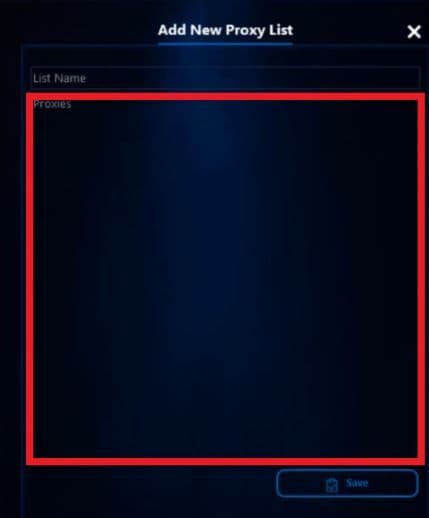
In the Add New Proxy List window, type a name in List Name.
In the Geonode dashboard, set the country of the store, pick sticky sessions and copy the list in IP:Port:Username:Password format, one session per task. The country-targeting guide in the troubleshooting links shows the username format.
Paste the list into the Proxies box, one proxy per line.
Click Save. The list appears with its name, Number of Proxies and Actions.
Create a second list for monitoring with about 20% of your proxies. Skip monitor lists on Adidas and other Demandware sites.
When you create a task in the Tasks tab, select the proxy list you saved.
Check detailed instructions on our blog:
Read the blog postCheck a new list outside the bot before you load it.
Paste the list into FOGLDN Proxy Tester or the Geonode proxy checker. Remove proxies that fail or show a high ping.
Before a release, run one task on the store and read its log for proxy errors.
In the Proxies tab, click edit in the Actions column to delete dead lines from a list, or delete to remove the whole list.
Click Delete All at the bottom of the Proxies tab to clear every list. Those tasks then use your own IP.