Best for Craigslist
Residential proxies
from $0.27/GB
The IPs come from home ISPs, and Geonode can target a US state or city, so the IP matches the Craigslist site you post to; sticky sessions hold one IP for up to 24 hours.
Craigslist works on
Which proxy to use
A residential proxy in the same city or state as the Craigslist site you post to, set in the OS or browser. Craigslist has no proxy field.
How Craigslist picks your city
craigslist.org sends you to the site for the area of your IP address, but every city site (for example sfbay.craigslist.org) opens for anyone by its URL. To read listings in another city you don't need a proxy.
Terms of Use
The Terms allow only the Craigslist app, general-purpose browsers and email clients, forbid collecting content with scripts or scrapers, and forbid bypassing moderation such as blocks. They also set liquidated damages of $0.25 per page for viewing more than 1,000 pages in 24 hours.
Phone verification
Some postings ask for a one-time code by voice call or text before they go live. The code goes to your phone number, so the proxy has no effect on this step.
Craigslist has no proxy field in the site or the app, so the proxy goes into the operating system, the browser or a proxy client app.
| Name | Works In | Auth | Blocking Resistance | Best For | Where To Get |
|---|---|---|---|---|---|
| System proxy (Windows, macOS, iPhone Wi-Fi) | craigslist.org in Chrome, Edge and Safari, which follow the system proxy | Username and password (the browser prompts on Windows) | Same as the IP behind it | Posting and replying from your own computer | Geonode residential or ISP proxies |
| Browser extension (for example Proxy SwitchyOmega) | Only the browser or browser profile it is installed in | HTTP or SOCKS5; username and password depend on the extension | Same as the IP behind it | Keeping Craigslist on one IP while other sites use your normal connection | Geonode residential proxies |
| Proxy client app (Android) | The Craigslist app and Chrome on Android; the client routes apps through a local VPN | SOCKS5 or HTTP with username and password | Same as the IP behind it | The Android app with a password-protected proxy | Geonode residential proxies |
Craigslist does not publish how it scores IPs. For posting, use an IP in the same area as the Craigslist site you post to.
from $0.27/GB
The IPs come from home ISPs, and Geonode can target a US state or city, so the IP matches the Craigslist site you post to; sticky sessions hold one IP for up to 24 hours.
from $1.25/IP
The IP never changes, so a Craigslist account logs in from the same address every day.
from $0.14/GB
Hosting IP ranges are public, so Craigslist can see the traffic comes from a server and not a home connection.
Free
Many people share each one, so the IP may already be blocked on Craigslist, and many stop working within hours.
Copy the proxy host (hostname or IP), port, username and password from your Geonode dashboard before you start.
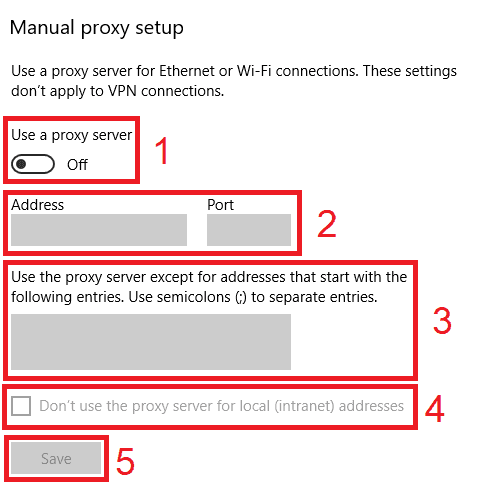
Open Settings > Network & internet > Proxy.
Under Manual proxy setup, click Set up next to Use a proxy server.
Turn on Use a proxy server.
Enter the host in Proxy IP address and the number in Port.
Click Save.
Open craigslist.org in Chrome or Edge and enter the proxy username and password when the browser asks.
Check detailed instructions on our blog:
Read the blog postOpen Geonode's What is my IP page in the same browser or on the same phone; it should show the proxy IP and city.
Type craigslist.org into the address bar. It should open the Craigslist site for the proxy's area, not your own.
Pick the Craigslist site before you write the post. A post's site can't be changed later, and you can't post to more than one site at a time.
Windows: in Settings > Network & internet > Proxy, click Edit next to Use a proxy server and switch it off. macOS: switch off the proxy under Details > Proxies. iPhone: set Configure Proxy back to Off.
Android: tap Disconnect in the proxy client app, then force-stop Craigslist so it opens a new connection.