

Geonode logo
Sites & services

Dailymotion Proxy How to Unblock It and Which Type to Use

Dailymotion works on

  • Web
  • Android
  • iOS

Key facts

  • Two kinds of block

    Some countries block the whole site: Russia since 2017 after a Moscow City Court copyright ruling, and Kazakhstan blocked it in August 2011. Separately, uploaders can restrict a video to, or exclude it from, a list of countries, and Dailymotion checks your IP to apply it.

  • Watching without an account

    Most videos play without signing in. Videos marked as sensitive stay hidden for signed-out viewers and for accounts under 18, because the Hide sensitive content filter is always on for them.

  • Terms of Use

    Dailymotion's Terms do not mention VPNs or proxies. They do ban access by robots or scrapers without written approval, and any attempt to inflate views. Running view bots through proxies breaks both rules.

Ways to route Dailymotion through a proxy

Dailymotion has no proxy setting of its own, so the method depends on the browser or device you watch on. For SOCKS5 with a password on a computer, use a browser extension in Firefox.

NameWorks InAuthBlocking ResistanceBest ForWhere To Get
System proxy (Windows, macOS, iPhone Wi-Fi)dailymotion.com in Chrome, Edge, Brave and Safari, which follow the system proxyWindows has no password fields, so the browser asks for the username and password; macOS and iPhone have a password toggleSame as the IP behind itWatching on one computer or iPhoneGeonode residential or ISP proxies
Firefox network settingsFirefox only; it keeps its own proxy settings separate from the systemHTTP with username and password (Firefox asks when a site first loads). SOCKS5 in Firefox settings works only without a password; for SOCKS5 with a password use an extension such as FoxyProxy or whitelist your IP.Same as the IP behind itUsing a proxy for Dailymotion while other browsers connect directlyGeonode residential proxies; Geonode free list for a test
Browser extension (for example ZeroOmega or FoxyProxy)Only the Chrome, Edge or Firefox install it is added toHTTP with username and password in any browser. SOCKS5 with a password works in Firefox only, not in ChromeSame as the IP behind itSwitching the country quickly for one site, or SOCKS5 with a password in FirefoxGeonode residential proxies
Proxy client app (Android, for example Super Proxy)The Dailymotion Android app and mobile browsers; the client routes traffic through a local VPNSOCKS5 or HTTP with username and passwordSame as the IP behind itThe Android app with a password-protected proxyGeonode residential proxies

Which proxy type to use with Dailymotion

Geoblocking follows the country of the IP, so the proxy's location matters more than its type. Dailymotion does not say whether it treats datacenter IPs differently.

Best for Dailymotion

Residential proxies

from $0.27/GB

You choose the country, and the IP belongs to a home ISP there. A sticky session holds the same IP for up to 24 hours, so a long video does not switch countries mid-play. Residential is billed per GB, so it suits occasional viewing; for regular watching an ISP proxy is cheaper to run because it is not metered per GB.

Good for daily use

ISP proxies

from $1.25/IP

You get one fixed IP in one country, so a signed-in account always shows up from the same place.

Works, but less predictable

Datacenter proxies

from $0.14/GB

Geolocation databases sometimes list a hosting IP under a different country than the one you picked. Then you hit the wrong geoblock.

Testing only

Free public proxies

Free

Free proxies are shared and slow, so video buffers. You also can't count on getting the country you asked for.

How to set up a proxy for Dailymotion

Have the proxy host, port, username and password from your Geonode dashboard ready, and pick an IP in a country where the video is allowed.

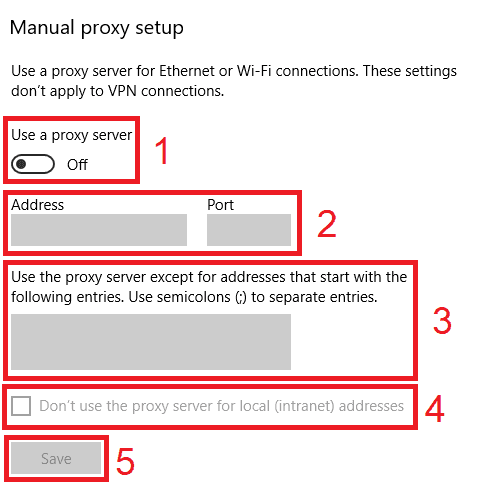
  1. Open Settings > Network & internet > Proxy.

  2. Under Manual proxy setup, click Set up next to Use a proxy server.

  3. Turn on Use a proxy server.

  4. Enter the host in Proxy IP address and the number in Port.

  5. Tick Don't use the proxy server for local (intranet) addresses if you need local devices.

  6. Click Save.

  7. Open dailymotion.com in Chrome or Edge and enter the proxy username and password when the browser asks.

Check detailed instructions on our blog:

Read the blog post

How to check that the proxy works

  1. Open Geonode's What is my IP page in the same browser or on the same phone; it should show the proxy IP and its country.

  2. Reload the Dailymotion video that was blocked. If it now plays, the proxy country is allowed for it.

  3. Set a higher quality in the player settings and let the video run for a minute. If it doesn't stall, the proxy is fast enough to watch on.

How to turn the proxy off

  1. Windows: in Settings > Network & internet > Proxy, click Edit next to Use a proxy server and switch it off. macOS: switch off Secure web proxy under Details > Proxies. iPhone: set Configure Proxy back to Off.

  2. Android: tap Stop in Super Proxy. Firefox or an extension: switch back to No proxy or Direct.

Common Dailymotion proxy problems and fixes

  • The video still says it is not available in your country

    Cause
    The browser is not using the proxy, or the uploader also blocks the proxy's country
    Fix
    If the IP check from the verify step shows the proxy, pick another country, usually the uploader's home country.
  • dailymotion.com does not load at all with the proxy on

    Cause
    The school, office or ISP network blocks connections to the proxy port, or the proxy is down
    Fix
    Try the same proxy on mobile data. If it works there, the local network is blocking it. If it fails there too, run it through the Geonode proxy checker.
  • A video asks you to sign in even with the proxy on

    Cause
    The video is marked as sensitive
    Fix
    Sign in with an account aged 18 or over and check the sensitive content setting in your Dailymotion account.
  • The browser keeps asking for the proxy password (error 407)

    Cause
    Wrong proxy username or password
    Fix
    Copy the proxy credentials from the Geonode dashboard again; your Geonode account login does not work here.

More for Dailymotion users

Dailymotion proxy FAQ

Open dailymotion.com or the app and press play. Most videos need no account; only videos marked as sensitive are hidden from signed-out viewers.

No. Sensitive videos need a signed-in account aged 18 or over. A proxy or VPN changes your IP, not your account status.

Route your browser or phone through a proxy in a country where the site or the video is allowed, for example the uploader's home country. On a school or office network, the proxy works only if the network lets you connect to its port, and the network owner's rules still apply.

A web proxy site loads Dailymotion on its own server and passes the page to you, so its operator sees what you watch and any password you type. Many also add their own ads. Don't sign in to Dailymotion through one.

Both change the country Dailymotion sees. A VPN moves all traffic on the device. A browser proxy or extension changes it for one browser, and your other apps keep the normal connection.

No. Neither dailymotion.com nor the Android and iOS apps have a proxy field, and there is no Dailymotion proxy driver to install. The proxy goes into the operating system, the browser, an extension or a proxy client app.