Best for Netflix
Residential proxies
from $0.27/GB
The IPs belong to home ISPs, so Netflix sees an ordinary viewer's connection. A sticky session keeps one IP for up to 24 hours, which means the IP won't change mid-episode.
Netflix works on
How Netflix picks your country
Netflix works out your location from your IP address (Privacy Statement). The catalog follows the country of the IP you connect from; the account country is the one you signed up in.
Plans with ads and Live events
Netflix's help center says VPNs aren't supported on an ad-supported plan or for watching Live events. On those, expect the proxy error whatever IP you use.
Terms of Use
Section 1.5 limits viewing primarily to your account country; Netflix may treat a proxy as circumventing content protections under 1.8.
The Netflix apps have no proxy field, so where you set the proxy depends on the device. Netflix checks the IP, so the method doesn't change blocking.
| Name | Works In | Auth | Blocking Resistance | Best For | Where To Get |
|---|---|---|---|---|---|
| System proxy (Windows, macOS) | netflix.com in Chrome, Edge and Safari, which follow the system proxy | Windows has no password fields, so the browser asks for the username and password; macOS has a Proxy server requires password toggle | Chrome and Edge send DNS through the proxy, so your real location doesn't leak to Netflix | Watching in a browser on your own computer | Geonode residential proxies |
| Browser extension (for example Proxy SwitchyOmega) | Only the browser it is installed in | HTTP or SOCKS5; password support depends on the extension | DNS leaks your real location unless the extension resolves through the proxy (SOCKS5 in SwitchyOmega does) | Checking Netflix pages from another country without changing system settings | Geonode residential proxies |
| Wi-Fi proxy (iPhone and iPad) | Safari and apps that follow the iOS system proxy | HTTP only, with an Authentication toggle for username and password | Only covers the Wi-Fi network you set it on; on mobile data Netflix sees your real IP | netflix.com on an iPhone or iPad | Geonode residential proxies |
| Proxy client app (Android) | The Netflix app and Chrome; the client routes apps through a local VPN | SOCKS5 or HTTP with username and password. Android's own Wi-Fi proxy has no password fields | Per-app routing that skips Netflix leaves it on your real IP | The Android Netflix app | Geonode residential proxies |
Netflix keeps lists of IPs used by VPNs and proxies and shows error E106 when you connect from one. Shared IPs end up on those lists first.
from $0.27/GB
The IPs belong to home ISPs, so Netflix sees an ordinary viewer's connection. A sticky session keeps one IP for up to 24 hours, which means the IP won't change mid-episode.
from $1.25/IP
You get the same IP every day, but the range is registered to a data center, so Netflix may already list it.
from $0.14/GB
Hosting IP ranges are public. VPN and proxy blocklists add them first.
Free
Thousands of people use the same free IPs, so Netflix has usually listed them already. Most are also too slow for HD.
Copy the proxy host, port, username and password from your Geonode dashboard. Then set the proxy on the device you watch on.
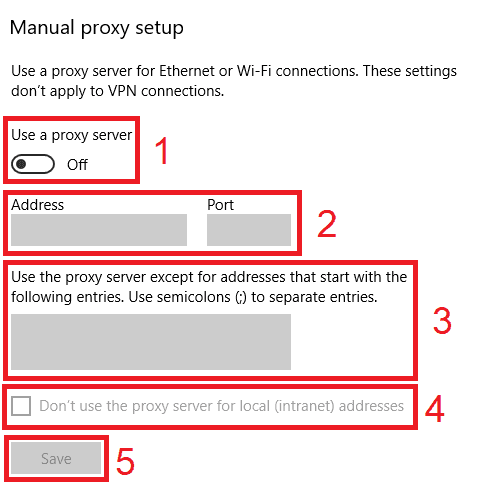
Open Settings > Network & internet > Proxy.
Under Manual proxy setup, click Set up next to Use a proxy server.
Turn on Use a proxy server.
Enter the host in Proxy IP address and the number in Port.
Click Save.
Open netflix.com in Chrome or Edge and enter the proxy username and password when the browser asks.
Check detailed instructions on our blog:
Read the blog postOpen Geonode's What is my IP page in the same browser or on the same phone; it should show the proxy IP and country.
Go to fast.com, Netflix's speed test, and click Show more info. The country next to Client is the one Netflix sees, and the speed should stay above the rate your video quality needs.
Play a title for a minute. No error and a picture that reaches HD means the proxy works.
Windows: in Settings > Network & internet > Proxy, click Edit next to Use a proxy server and switch it off. macOS: turn off the proxy under Details > Proxies. iPhone: set Configure Proxy back to Off.
Android: tap Disconnect in the proxy client app, then force-stop Netflix so it opens a new connection.