Best for Roblox
Residential proxies
from $0.27/GB
It is the only Geonode type that relays UDP over SOCKS5. A sticky session can keep one IP for up to 24 hours.
Roblox works on
Proxy setting in Roblox
None. Roblox follows the system proxy for web traffic only. Games run in the installed Roblox Player over UDP and need a SOCKS5 client with UDP, so a web proxy site can load roblox.com but not an experience.
Account location
Shown under Account Settings > Account Info. The Roblox Subscription Terms forbid buying a subscription through a VPN or anything else that hides your location.
Countries that block Roblox
As of September 2026, Roblox is blocked nationally in Turkey, Qatar, Oman, Iraq, Algeria, Egypt and Palestine, among others. Getting around a national block can break local law. That risk is yours.
Roblox has no proxy field of its own, so the method you pick decides which traffic goes through the proxy.
| Name | Works In | Auth | Blocking Resistance | Best For | Where To Get |
|---|---|---|---|---|---|
| System proxy (HTTP or HTTPS) on Windows or macOS | The website, sign-in and asset downloads in the Roblox app. Game server traffic skips it and goes out over UDP | Windows: no username or password fields, so whitelist your IP in the Geonode dashboard. macOS: Proxy server requires password toggle with Username and Password | Low | Reaching roblox.com on a filtered network, and IP checks | Geonode residential, ISP or datacenter proxies; Geonode free list (HTTP, HTTPS) |
| SOCKS5 with UDP in a tunnel app | The whole Roblox app, experiences included: v2rayN in Tun mode on Windows and macOS, v2rayNG on Android, Shadowrocket on iPhone and iPad | Username and password | Medium: the SOCKS5 handshake is unencrypted, so a network filter can spot it | Networks that block the game, and one fixed IP per account | Geonode residential proxies with UDP enabled |
| HTTP(S) or SOCKS5 proxy in your own script | Requests from your code to Roblox web APIs, such as game, catalog and user endpoints | Username and password in the proxy URL | Depends on the IP type and request rate | Collecting public game and catalog data | Geonode residential (rotating) or datacenter proxies |
Pick by what you do. Playing needs a UDP relay; scraping public web APIs needs many IPs.
from $0.27/GB
It is the only Geonode type that relays UDP over SOCKS5. A sticky session can keep one IP for up to 24 hours.
from $1.25/IP
A fixed IP suits one account on roblox.com. It has no UDP relay, so experiences won't run through it.
from $0.14/GB
Fine for bulk requests to public web APIs. There is no UDP relay, so don't use it to play.
Free
Public proxies are shared and drop offline often. Few of them relay UDP.
The Windows and macOS system proxy guides cover web traffic only. The v2rayN and phone guides send games through the Geonode residential UDP gateway.
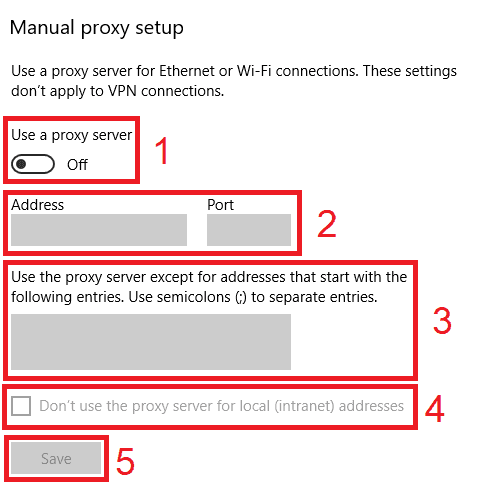
Open Settings > Network & internet > Proxy.
Under Manual proxy setup, select Set up next to Use a proxy server.
Turn on Use a proxy server.
Enter the proxy host in Proxy IP address and the port in Port.
Tick Don't use the proxy server for local (intranet) addresses and select Save.
Windows has no login fields, so add your IP to the IP whitelist in the Geonode dashboard before you connect, then restart Roblox.
Check detailed instructions on our blog:
Read the blog postOpen Geonode's What is my IP page on the same device. It should show the proxy's country, not yours.
In v2rayNG, tap the status line at the bottom. If the proxy works, it reads Connection succeeded with a time in milliseconds.
Join an experience with the proxy off, then with it on. If it only fails with the proxy on, the proxy isn't relaying UDP.
Windows: turn off Use a proxy server under Settings > Network & internet > Proxy. macOS: turn off both proxy switches under Details > Proxies.
v2rayN: turn off Enable Tun. v2rayNG: tap the stop button. Shadowrocket: turn off the connection switch on the Home screen.