Best for Viber
Residential proxies
from $0.27/GB
It can relay UDP once you add a flag to the username, and sticky ports hold one IP for up to 24 hours.
Viber works on
Where the setting is
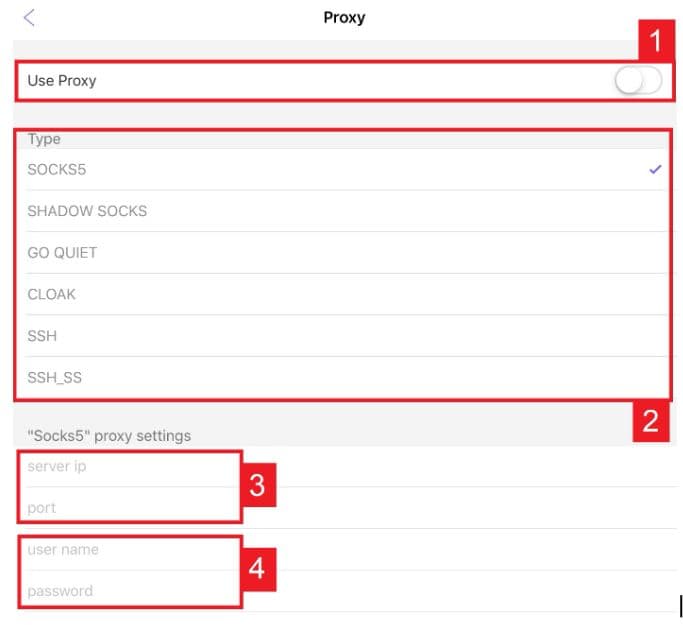
Phone: More > Settings > General > Use proxy server. Desktop: Settings > Privacy & Security, then Manage under Use proxy server. There's no HTTP type, so get SOCKS5 details.
Where Viber is blocked
Roskomnadzor blocked Viber in Russia on December 13, 2024. In 2018 the UAE regulator said Viber's call service was never licensed there, and Viber's help still lists the UAE among countries where Viber Out may have connection problems.
What your number decides
Viber Out classes a call as domestic or international by the two numbers' country codes, and a proxy doesn't change that. Viber's help also ties some regional features to the country your number is registered in.
Viber lists six types. Geonode supplies SOCKS5, and the other five need a server you control.
| Name | Works In | Auth | Blocking Resistance | Best For | Where To Get |
|---|---|---|---|---|---|
| SOCKS5 | Viber for Android, iPhone, iPad and desktop | Username and password in their own fields | Low. The traffic isn't disguised, so a national filter can spot it | Networks that block Viber but don't filter proxies | Geonode residential or ISP proxies |
| ShadowSocks | Same apps | Username, password and an encryption method | Medium. Shadowsocks is an encrypted tunnel built to get past firewalls | Networks that already filter plain SOCKS5 | Your own VPS running a Shadowsocks server such as shadowsocks-rust. Geonode doesn't sell this type |
| Cloak or GoQuiet | Same apps | Cloak: password, public key, server name, encryption method. GoQuiet: username, password, key, server name, encryption method | High. Both make the server look like an ordinary HTTPS site. GoQuiet is rarely maintained, and its author points users to Cloak | Countries that block Viber outright | A Cloak server you host yourself (github.com/cbeuw/Cloak), placed in front of Shadowsocks |
| SSH or SSH_SS | Same apps | SSH: server IP, port, username, password, encryption method. SSH_SS replaces the method with an SS port and SS password | Medium | Anyone who already logs in to a server abroad over SSH | Any server you can SSH into (not a Geonode product) |
Pick residential. Viber desktop needs its ports open for UDP as well as TCP, and residential is the Geonode type with a documented UDP option, which calls may need.
from $0.27/GB
It can relay UDP once you add a flag to the username, and sticky ports hold one IP for up to 24 hours.
from $1.25/IP
Each Viber account can keep its own assigned IP, but Geonode's UDP guide doesn't cover ISP proxies, so test a call first.
from $0.14/GB
Its SOCKS5 option can get Viber past an office firewall that closes only Viber's ports.
Free
A free proxy can't read 1-on-1 chats, groups or 1-on-1 calls, which Viber encrypts end to end, but strangers share its IP.
SOCKS5 in Viber needs an IP address, port, username and password, and the Geonode dashboard lists each proxy as hostname:port:username:password.
Open Viber and tap More, then Settings.
Tap General, then Use proxy server.
Switch Use proxy server to ON.
Select SOCKS5 as the proxy type.
Fill in the IP address, port, username and password.
Tap Back to save.
Restart Viber. On Android, close it fully with General > Exit, then reopen it.
Check detailed instructions on our blog:
Read the blog postSend a message and watch the icon by its timestamp. If it stays on 'being sent', Viber can't reach its servers through the proxy. 'Sent' means it can. 'Received' can lag while the contact's phone is off.
Forward a photo to My Notes on your phone. Notes sync to every linked device, so if it opens in Viber desktop, both connections work.
Make a short call and check that audio works both ways. If the call is silent while chats work, use the no-sound fix below.
On a phone, open Use proxy server again, switch it OFF, tap Back and restart Viber.
On desktop, open Settings > Privacy & Security, switch off Use proxy server and restart Viber.