Best for VK
Residential proxies
from $0.27/GB
Residential IPs look like a normal VK user, and a sticky session keeps one IP for up to 24 hours.
VK works on
Where VK is blocked
Ukraine has blocked VK since May 2017 under sanctions it has renewed since. Turkmenistan has blocked it since December 2018.
VK TURN proxy
An open-source tool (cacggghp/vk-turn-proxy) that tunnels WireGuard through VK call servers to your own VPS, for networks that let only VK through. It does not open VK itself; setup steps are in the vk-turn-proxy tab below.
VK rules
VK's terms ban bots and scripts that collect data or act on the site without permission from VK. A proxy does not change that, and VK can block accounts that break it.
There is no field for your own proxy in the VK app or on vk.ru, so the proxy goes into the device, the browser or a separate client app.
| Name | Works In | Auth | Blocking Resistance | Best For | Where To Get |
|---|---|---|---|---|---|
| System or Wi-Fi proxy (HTTP/HTTPS) | vk.ru in Chrome or Safari; the VK app on iPhone on the configured Wi-Fi | macOS and iPhone have a password switch; Windows has none, so the browser asks | Gets past DNS and IP blocks; traffic inspection can still see the VK hostname | VK on a laptop in a country that blocks it | Geonode residential, ISP or datacenter proxies; Geonode free list for a test |
| Proxy client app in VPN mode | The VK app and every other app on Android and iPhone, on Wi-Fi and mobile data | SOCKS5 or HTTP with username and password, typed into the client | Same as the IP type; every app on the phone shares the proxy IP | The VK app on a phone | Geonode residential or ISP proxies (SOCKS5 port) |
| Anti-detect browser profile | vk.ru inside each profile of an anti-detect browser such as AdsPower or Dolphin Anty | HTTP or SOCKS5 with username and password per profile | Each profile keeps its own IP and cookies | Several VK accounts on one computer, one IP per account | Geonode ISP proxies, or residential with a sticky session per profile |
| vk-turn-proxy (WireGuard over VK call servers) | Phone and desktop clients, plus your own VPS running WireGuard | TURN login and password generated from a VK call link | Traffic goes to VK's call servers, so it passes Russian mobile whitelists that allow VK. VK can block this use | Leaving a network that only lets VK through; it does not help you reach VK | Open source on GitHub (cacggghp/vk-turn-proxy); not sold by Geonode |
Blocks on VK come from ISPs, so any foreign IP opens the site. The type matters once you log in. For vk-turn-proxy you need a VPS, not a proxy.
from $0.27/GB
Residential IPs look like a normal VK user, and a sticky session keeps one IP for up to 24 hours.
from $1.25/IP
Each account keeps one fixed IP for months, which suits agency and brand pages run from one office.
from $0.14/GB
Datacenter IPs are a poor match for an account you log in to every day.
Free
Shared by many people and often offline, so use them to check that VK opens, never to log in.
Have the proxy host, port, username and password from your proxy dashboard ready.
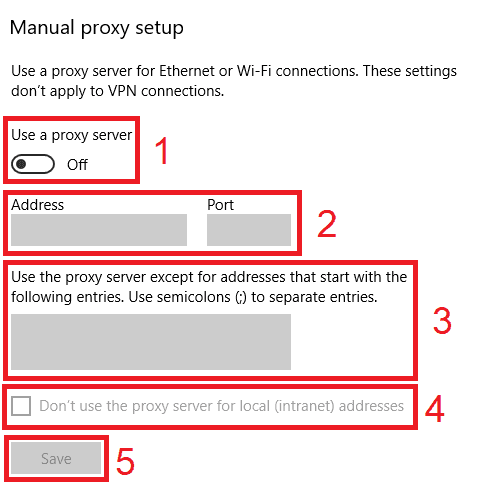
Open Settings > Network & internet > Proxy.
Under Manual proxy setup, click Set up next to Use a proxy server.
Turn on Use a proxy server.
Enter the host in Proxy IP address and the number in Port.
Click Save.
Open vk.ru in Chrome or Edge and enter the proxy username and password when the browser asks.
Check detailed instructions on our blog:
Read the blog postOpen the Geonode What is my IP page in the same browser, or on the phone with the proxy client connected. It should show the proxy IP and country.
Open vk.ru and scroll the feed; photos and video should load.
In your VK ID account open Security > Devices and activity. The current session should show the proxy's approximate location.
For vk-turn-proxy, the WireGuard app should show a recent handshake and rising received data after you connect.
Windows: Settings > Network & internet > Proxy > Set up, switch off Use a proxy server and click Save. macOS: in Details > Proxies switch the proxy off and click OK.
Phones: tap Disconnect in the proxy client, or set Configure Proxy back to Off in the iPhone Wi-Fi settings.
vk-turn-proxy: disconnect WireGuard, stop the client, and point the WireGuard Endpoint back at your server.