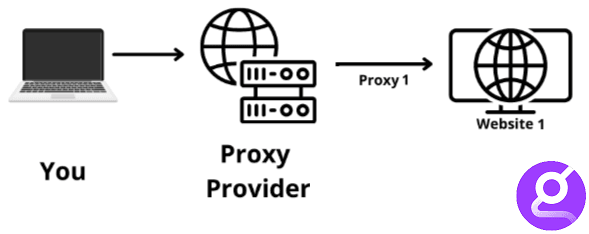
A proxy server sits between your device and the website you are visiting. Your request goes to the proxy first. The proxy forwards it using its own IP address, receives the response, and hands it back to you. To the website, the visitor is the proxy, not you.
That is useful when you need a different IP, a specific country or city, or more than one address for data collection and testing. It is not, by itself, an encryption tool and it is not a free proxy list. If you already know you need an address and want the steps to obtain one, use how to get a proxy server.
How a Proxy Server Works
A typical request looks like this:
- Your browser, app, or script is configured to use a proxy host and port (and, for a paid proxy, a username and password).
- The client sends the request to the proxy instead of to the website directly.
- The proxy may authenticate you, apply routing rules, or reuse a cached response.
- If it forwards the request, the website sees the proxy's IP address.
- The website responds to the proxy, and the proxy returns the response to you.
The same pattern works for a person in a browser and for an automated client. Businesses also use proxies in the other direction — as a reverse proxy in front of their own servers, for load balancing and TLS termination. The rest of this article is about forward proxies: a client using another IP to reach the public web.
Types of Proxy Servers and Which to Use
People use "proxy type" to mean several different things: which side of the connection the proxy sits on, where the IP comes from, whether the IP stays the same, which protocol you speak, and whether the address is shared. Start with the task, not the label.
Forward vs reverse
A forward proxy works for the client. Your browser or scraper sends traffic through it before the request reaches the website. This is the type used for web data collection, location testing, and ad verification.
A reverse proxy works for the server. It sits in front of a website, terminates TLS, balances load, and can cache responses. You do not buy a reverse proxy when you want a different exit IP.
Residential, ISP, datacenter, and mobile
These names describe where the IP comes from, which is what most websites actually check.
- Residential proxies use IP addresses associated with consumer internet connections. They are the usual choice when a site treats datacenter ranges as automation. Geonode residential proxies are published from $0.27/GB at volume (the 10 GB monthly plan is $0.79/GB), with 7.5M+ residential IPs active monthly across 150+ countries (figures from the residential product page, checked 11 November 2026, Europe/Kyiv).
- ISP proxies are static IPs registered to an internet service provider and usually hosted in a data center. They keep the same address, with unlimited bandwidth billed per IP, which fits longer sessions and account-style work. Geonode ISP proxies start at $1.25/IP per month (from the ISP product page, checked 11 November 2026).
- Rotating datacenter proxies use IPs from hosting networks. They are faster and cheaper, and easier for some sites to detect. Geonode datacenter proxies start at $0.14/GB (from the pricing page, checked 11 November 2026). For the educational overview, see the complete guide to datacenter proxies.
- Mobile proxies use IPs assigned by cellular carriers, not by a home broadband line or a hosting company. They are a narrower, usually more expensive option, for targets that treat carrier addresses differently.
Rotating vs sticky (or static)
A rotating proxy changes the exit IP between requests or sessions, which spreads traffic across a pool. A sticky or static proxy keeps the same IP for a period or indefinitely. Use sticky or static when a login, cart, or multi-step flow should not jump to a new address mid-session.
HTTP, HTTPS, and SOCKS5
An HTTP proxy forwards web requests. HTTPS here usually means the client can tunnel a TLS session to the destination, so the website traffic itself stays encrypted between you and the site. SOCKS5 works at a lower level and can carry more than web traffic, including UDP. Geonode supports HTTP, HTTPS, and SOCKS5; pick the protocol your application actually speaks.
A proxy protocol is not the same thing as a VPN. The proxy does not automatically encrypt all traffic from your device.
Shared vs dedicated
A shared (or public) proxy is used by more than one customer. A dedicated proxy is reserved for you. Shared is cheaper and can inherit the reputation of everyone else on that IP. Dedicated costs more and isolates that risk.
Task to type
| Task | Start with | Why |
|---|
| Location-based web data, ad checks, sites that block datacenter ranges | Residential proxies | Consumer IPs with location targeting |
| A stable address for a longer session | ISP proxies | Static, ISP-assigned, billed per IP |
| High-volume public pages that accept datacenter IPs | Rotating datacenter proxies | Faster and cheaper per GB |
| You only need the page content, not a raw proxy | Scraper API | The API handles fetching, and often rendering, for you |
| Quick test of a public IP | Free proxy list | Fine for learning; not for credentials or production |
How to Set Up a Proxy Server on Your Device
You need three things from the proxy provider: the address (hostname or IP), the port, and — for paid proxies — a username and password. Free proxies from a free proxy list usually have no login. Then:
Chrome (Windows, macOS, Linux)
Chrome uses the operating system's proxy settings. Open chrome://settings/system → "Open your computer's proxy settings" and follow the Windows or macOS steps below. To use a different proxy per browser profile, use an extension such as Proxy SwitchyOmega and enter host, port, and credentials there.
Firefox
Settings → General → scroll to "Network Settings" → "Settings…" → choose "Manual proxy configuration". Enter the host and port for HTTP; tick "Also use this proxy for HTTPS". For a SOCKS proxy, fill the SOCKS Host field and select SOCKS v5. Firefox will prompt for the username and password on the first request.
Windows 11
Settings → Network & internet → Proxy → under "Manual proxy setup" click "Set up" → switch "Use a proxy server" on → enter the address and port → Save. Windows applies this to Edge, Chrome, and most apps. Credentials are requested by the browser on first use.
macOS
System Settings → Wi-Fi (or Ethernet) → "Details…" next to your network → Proxies → enable "Web Proxy (HTTP)" and "Secure Web Proxy (HTTPS)" → enter server and port, and the username and password if the proxy requires them → OK.
Android
Settings → Network & internet → Internet → long-press your Wi-Fi network → Modify → Advanced options → Proxy: Manual → hostname and port → Save. This applies to Wi-Fi only; mobile data uses the APN proxy fields, which most carriers do not let you edit.
In code (Python)
import requests
proxies = {"http": "http://user:pass@host:port", "https": "http://user:pass@host:port"}
print(requests.get("https://api.ipify.org", proxies=proxies).text)
If the printed IP is the proxy's, not yours, the proxy is in the path. You can also confirm the visible address with a free proxy checker or What Is My IP.
Proxy Server vs VPN
| Proxy server | VPN |
|---|
| What it changes | The IP address the website sees | The IP address and the device's traffic |
| Scope | One app or browser, unless you set it at the OS level | Everything on the device |
| Encryption | Only if the site uses HTTPS (the HTTP or SOCKS proxy does not add a tunnel by itself) | An encrypted tunnel to the VPN server |
| Speed | Usually faster; no tunnel overhead | Usually slower; every packet is encrypted |
| Per-request IP rotation | Yes — rotating proxies can change IP per request or session | No — one IP per VPN connection |
| Country or city targeting | Yes, down to city and ISP with the right proxy type | Country-level, sometimes city |
| Typical use | Web data collection, multi-account work, ad verification, SEO monitoring, checking a localized page | Personal privacy on public Wi-Fi, remote access, streaming on your own device |
| Price model | Per GB, per IP, or per request | Usually a flat monthly fee |
Use a VPN when you want your own device traffic in a private tunnel. Use a proxy when you need many IPs, a specific location, or per-application routing. They solve different problems; one is not a strict upgrade of the other. For a longer comparison, see the difference between a VPN and a proxy server.
How to Get a Proxy Server
There are three practical ways to get a proxy server:
- Use a free proxy list. This is enough for a quick test of a public page over HTTPS. Do not send passwords or payment data through a public proxy. The operator can see unencrypted traffic, and the address may already be overloaded or abused.
- Run your own. Install proxy software on a machine you control. You get logging and access rules, but you do not automatically get a pool of residential or city-level IPs, and you own the upkeep.
- Use a provider. You get a host, port, and credentials, and you choose residential, ISP, or rotating datacenter depending on the task above.
The step-by-step on choosing, testing, and wiring credentials is in how to get a proxy server.
Is a Proxy Server Safe?
A proxy can hide your original IP from the destination. That does not make the connection automatically secure or anonymous.
The proxy operator can see your source IP, the destination, timing, and volume. On plain HTTP, more of the request may also be visible. On HTTPS, the content of the session is encrypted between you and the destination, as long as TLS is end to end and you have not installed a custom intercepting certificate.
Treat unknown free public proxies as untrusted. They are useful for a quick test and a poor place to type a password. If you need a stable, authenticated setup, use a paid residential or ISP proxy from a provider whose logging and acceptable-use policies you can actually read.
Before you rely on a setup, check:
- The visible IP matches the proxy, not your home or office address. Use What Is My IP or a proxy checker.
- A WebRTC test does not leak another IP.
- DNS resolution is not bypassing the path you intended.
- The visible country or city matches the location you requested.
These checks catch obvious leaks. They do not prove "complete anonymity."
Frequently Asked Questions
What is a proxy server?
A proxy server is an intermediary between a client and a destination on the internet. Your request goes to the proxy; the proxy forwards it; the destination sees the proxy's IP address rather than yours.
What is a proxy server used for?
Common uses are changing the visible IP, reaching a location-specific version of a public page, distributing automated requests across many addresses, filtering or logging traffic on a company network, and caching. The right type depends on the task in the table above.
Is a VPN a proxy?
No. Both can route traffic through another server, but a VPN usually creates an encrypted tunnel for the device's traffic. A proxy is typically configured per application or protocol and does not, by itself, encrypt everything. See the difference between a VPN and a proxy server.
What is an example of a proxy server?
In everyday use: an HTTP or SOCKS5 forward proxy you configure in a browser or a script, with a host, port, and optional credentials. A reverse proxy such as the one in front of a public website is a different role — it protects or load-balances the server, rather than giving you a new exit IP.
What's the difference between residential, ISP, and datacenter proxies?
Residential IPs are associated with home internet connections and often rotate. ISP proxies are static IPs registered to an internet provider. Datacenter IPs come from hosting networks; they are usually the cheapest and fastest, and the easiest for some websites to flag. See the types section above.
Are free proxy servers safe?
Free public proxies are acceptable for testing and for reading public pages over HTTPS. Do not log into accounts or send payment data through one. For anything with credentials, use a paid residential or ISP proxy.
How do I check whether my proxy is working?
Open a "what is my IP" page through the proxy. If it shows the proxy's IP and the location you expect, the path is working. Use What Is My IP or the free proxy checker.
Are proxy servers legal?
Using a proxy is not illegal by itself. What you do through it still has to follow the law, the site's terms, and any rules that apply to the data you collect. A proxy does not make a prohibited activity permitted.
How do I get a proxy server?
Use a free proxy list to test, run your own server if you want to operate the software yourself, or get credentials from a provider. The practical steps are in how to get a proxy server.
What is a PAC file?
PAC stands for Proxy Auto-Configuration. A PAC file is a JavaScript file that tells a browser or application which proxy, if any, to use for a given URL.