Best for AdsPower
Residential proxies
from $0.27/GB
Residential IPs come from home connections, and a sticky session keeps one IP on a profile for up to 24 hours.
AdsPower works on
Any proxy works
AdsPower accepts any HTTP, HTTPS, SOCKS5 or SSH proxy. The static proxies it sells on the Proxies page are optional and SOCKS5 only.
Fingerprint follows the proxy
Timezone, Location and Language can be set to Based on IP, so AdsPower takes them from the proxy's location when the profile starts. Switch the proxy to another country and these values move with it.
Free plan
The Free plan gives 2 browser profiles and does not expire. No plan includes proxy traffic, so you bring your own proxies or buy them from AdsPower.
AdsPower takes HTTP/HTTPS, SOCKS5 and SSH proxies over IPv4 or IPv6, set per profile. Pick the protocol your provider lists for the port.
| Name | Works In | Auth | Blocking Resistance | Best For | Where To Get |
|---|---|---|---|---|---|
| HTTP / HTTPS | Profile Custom proxy field and the Proxies page list; IPv4 or IPv6 | Proxy username and Proxy password, or none | Set by the IP type (residential, ISP or datacenter) | Default choice when the provider gives an HTTP port | Geonode residential, ISP or datacenter proxies; Geonode free list |
| SOCKS5 | Profile Custom proxy field and the Proxies page list with a socks5:// prefix; IPv4 or IPv6 | Proxy username and Proxy password, or none | Set by the IP type; the protocol does not change how sites rate the IP | Ports that only offer SOCKS5 | Geonode residential or ISP proxies; Geonode free list |
| SSH | Profile Custom proxy field | Login details of the SSH server | Depends on the IP of the server you tunnel through | Routing a profile through your own VPS | Your own server; not sold by Geonode |
Ad and social platforms judge the IP each profile connects from. Facebook allows one personal account per person, so accounts that share an IP are easy to link. A separate IP and fingerprint per profile lowers that risk without removing it.
from $0.27/GB
Residential IPs come from home connections, and a sticky session keeps one IP on a profile for up to 24 hours.
from $1.25/IP
The IP is fixed, so an ad account or shop signs in from the same address for months.
from $0.14/GB
Social and ad platforms recognize datacenter ranges, so keep these for profiles that only collect data or view ads in a region.
Free
Free proxies are shared and often flagged, so use one only to see that a new profile passes Check proxy, never on a logged-in account.
Have the host, port, username, password and protocol from your provider's dashboard ready. Pick the Geonode country in the proxy username so the timezone and language AdsPower takes from the IP match the account's region.
Open AdsPower and click New profile in the upper left corner.
Enter a Name and choose the browser (SunBrowser or FlowerBrowser) and operating system.
In the Proxy section, choose Custom.
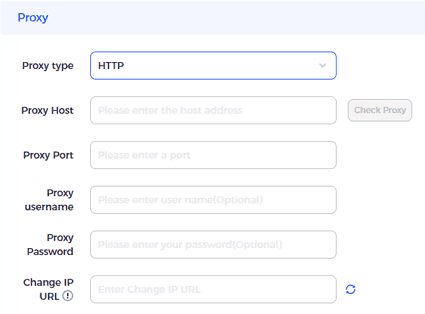
Open the Proxy type list and select HTTP, HTTPS, SOCKS5 or SSH.
Paste host:port:username:password into Host:Port and AdsPower fills in the other fields.
Or enter the host and port from the Geonode dashboard in Host:Port, then the proxy credentials in Proxy username and Proxy password. These are not your Geonode account login.
Leave Change IP URL empty unless your provider gives you a rotation link. Opening that link gets a new IP for every profile that uses the proxy.
Click Check proxy.
Click OK to save the profile.
Check detailed instructions on our blog:
Read the blog postClick Check proxy in the profile editor. Connection test passed means AdsPower reached the proxy; Connection test failed means it could not.
Start the profile and open the Geonode What is my IP page in it. It should show the proxy's IP and country, not your home connection.
On the Proxies page, look at the Outbound IP column after a check: green means the connection passed, red means it failed, and gray means the check is still waiting.
Open the profile's Edit screen as in Existing profiles, set Proxy type to No Proxy (Local network) and click OK.
To delete a saved proxy, open the Proxies page and delete it from the list.