Best for Dolphin Anty
Residential proxies
from $0.27/GB
Residential IPs belong to home connections, so they pass the IP-type checks that social and ad platforms run. A sticky session holds one IP per profile for up to 24 hours.
Dolphin Anty works on
One proxy per profile
Every browser profile has its own proxy field. A proxy saved once can be selected in several profiles, but those profiles then share one IP and a site can link them.
Fingerprint follows the proxy
Timezone, Geolocation and Language default to Auto, so Dolphin Anty takes them from the proxy's location. Change the proxy country and these values change with it.
Free plan limits
The Free plan allows 5 profiles, 50 saved proxies and 3 profiles running at once. Changing the proxy on many profiles at once (mass actions) needs a paid plan.
Use the protocol your provider lists for that port. The sites you open only see the exit IP.
| Name | Works In | Auth | Blocking Resistance | Best For | Where To Get |
|---|---|---|---|---|---|
| HTTP | All profiles on Windows, macOS and Linux | Username and password in the proxy string, or none | Set by the IP type (residential, ISP or datacenter) | Default choice when the provider gives an HTTP port | Geonode residential, ISP or datacenter proxies; Geonode free list |
| SOCKS5 | All profiles on Windows, macOS and Linux | Username and password in the proxy string, or none | Same as HTTP | Providers or ports that only offer SOCKS5 | Geonode residential or ISP proxies; Geonode free list |
| SOCKS4 | All profiles on Windows, macOS and Linux | None: SOCKS4 has no password field | Same as HTTP | Testing with free SOCKS4 proxies | Geonode free list |
| SSH | All profiles on Windows, macOS and Linux | SSH server login details | Depends on the IP of the server you tunnel through | Routing a profile through your own VPS | Your own server; not sold by Geonode |
Sites judge the IP a profile connects from. Facebook and Amazon ban linked accounts under their terms, and a clean fingerprint lowers that risk without removing it.
from $0.27/GB
Residential IPs belong to home connections, so they pass the IP-type checks that social and ad platforms run. A sticky session holds one IP per profile for up to 24 hours.
from $1.25/IP
The IP is fixed and can stay on one profile for months, so the account signs in from the same address every time.
from $0.14/GB
Facebook Ads and TikTok spot datacenter ranges and review the ad account, so keep these for profiles that only scrape or check ads in a region.
Free
Many people share them and a lot of them are already flagged. Use one to check that a new profile starts and passes the proxy check, never on a profile with a logged-in account.
You need the proxy host, port, username and password, and the protocol that port uses.
Open Dolphin Anty and click Create profile.
Enter a Name for the profile.
In the Proxy field, choose New proxy.
Select the protocol your provider lists for that port.
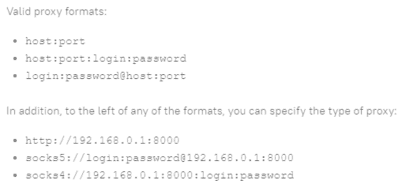
Paste the proxy as host:port:login:password or login:password@host:port. A Geonode sticky port looks like proxy.geonode.io:10000:username:password.
For a rotating proxy, paste the provider's URL into Link to change IP.
Click the check arrows next to the field and wait for the IP and location to appear.
Click Create profile.
Check detailed instructions on our blog:
Read the blog postAfter the check in the proxy field, Dolphin Anty shows the proxy's IP and country. A red status or Error means it did not connect.
Click Start on the profile and open the Geonode What is my IP page inside it. You should see the proxy's IP, not your home connection.
Open pixelscan.net in the same profile and check that timezone and language match the IP's country.
Click the pencil icon in the Proxy column and choose No proxy. The proxy stays saved on the Proxy screen.
To delete it completely, open the Proxy screen, tick the proxy and click Delete.