Best for DuckDuckGo
Residential proxies
from $0.27/GB
Each request can leave from a different home IP in the country you target, and a sticky session keeps one IP for up to 24 hours when you browse by hand.
DuckDuckGo works on
Built-in proxy setting
None that DuckDuckGo documents. Its browser for Windows, Mac, iOS and Android has no proxy field in settings and doesn't take extensions, so it uses the operating system's proxy.
How DuckDuckGo picks your location
DuckDuckGo estimates a rough location from your IP address for local results and doesn't store the IP. Behind a proxy, local results follow the proxy's location. A region picked in the region menu overrides that.
Android VPN slot
Android allows one active VPN connection at a time. App Tracking Protection and DuckDuckGo VPN both take that slot, so a proxy client app that connects through a local VPN won't run while either is on.
The method depends on where you search. The DuckDuckGo browser follows the system proxy, other browsers can use an extension, and scripts take the proxy in code.
| Name | Works In | Auth | Blocking Resistance | Best For | Where To Get |
|---|---|---|---|---|---|
| System proxy (Windows, macOS, iOS, Android Wi-Fi) | The DuckDuckGo browser and other browsers that follow the system proxy, such as Chrome, Edge and Safari | HTTP or HTTPS; login fields only on macOS and iOS | Same as the IP behind it | Searching in the DuckDuckGo browser on your own computer | Geonode residential or ISP proxies; Geonode free list |
| Browser extension in Chrome, Firefox or Edge | duckduckgo.com opened in the browser that has the extension; not the DuckDuckGo browser | HTTP or HTTPS with username and password. SOCKS5 with a login works only in Firefox. | Same as the IP behind it | DuckDuckGo search behind a proxy while other apps stay direct | Geonode browser extension with Geonode residential proxies |
| Proxy in code (Python requests, Scrapy, Puppeteer) | Scripts that request html.duckduckgo.com or duckduckgo.com result pages | http://USERNAME:PASSWORD@host:port in the proxy URL | Same as the IPs behind it | Collecting search results for SEO and keyword research | Geonode rotating residential proxies |
For personal searching, any working IP is fine. For scraping, what matters is how many distinct IPs the queries are spread over.
from $0.27/GB
Each request can leave from a different home IP in the country you target, and a sticky session keeps one IP for up to 24 hours when you browse by hand.
from $1.25/IP
One fixed IP keeps local results in the same city every day. In a scraper, that single address hits the rate limit fast.
from $0.14/GB
Shares IP ranges with hosting companies, so it gets challenged sooner than residential when you send a lot of queries.
Free
Many users share each free proxy and many go offline within hours. Fine for checking that a setup works.
Copy the proxy host (hostname or IP), port, username and password from your Geonode dashboard before you start.
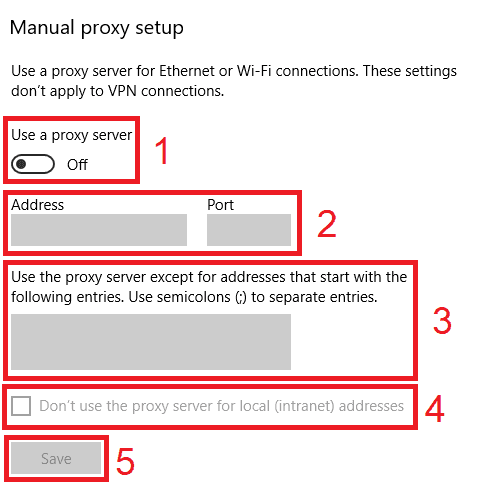
Open Settings > Network & internet > Proxy.
Under Manual proxy setup, click Set up next to Use a proxy server.
Turn on Use a proxy server.
Enter the host in Proxy IP address and the number in Port.
Click Save.
Restart the DuckDuckGo browser and open duckduckgo.com. If a sign-in prompt appears, enter the proxy username and password.
Check detailed instructions on our blog:
Read the blog postOpen Geonode's What is my IP page in the DuckDuckGo browser. It should show the proxy IP and country, not yours.
Search for weather on duckduckgo.com. Local results and the region menu should match the proxy's country.
For a script, request the What is my IP page through the same proxy and print the IP before the real queries.
Windows: in Settings > Network & internet > Proxy, click Edit next to Use a proxy server and turn it off. macOS: in Details > Proxies, turn off Web proxy and Secure web proxy, then click OK.
iOS: in Settings > Wi-Fi, tap (i) next to the network, tap Configure Proxy, select Off and tap Save.
Android: set Proxy back to None in the Wi-Fi network's Advanced options, or tap Disconnect in the proxy client app.
Scripts: remove the proxies option or the --proxy-server flag.