Best for Facebook
Residential proxies
from $0.27/GB
The IPs come from home internet connections, and a sticky session holds one IP for up to 24 hours, which covers a full working day
Facebook works on
Built-in proxy setting
None. The Facebook and Messenger apps and facebook.com have no proxy field, so the proxy goes into the operating system, the browser or an anti-detect browser profile.
New IP, new login check
Logging in from a new country can bring an unrecognized-login alert or an identity check. Keep one sticky IP in the country you usually log in from.
Terms of Service
Meta's Terms allow one personal account per person (section 3.1) and ban collecting data by automated means without permission (section 3.2). These rules still apply behind a proxy, and breaking them can get the account disabled.
Choose by where you use Facebook. The website works with a system proxy or an extension; the Android app needs a proxy client, and several accounts need separate browser profiles.
| Name | Works In | Auth | Blocking Resistance | Best For | Where To Get |
|---|---|---|---|---|---|
| System proxy (Windows, macOS, iPhone Wi-Fi) | facebook.com in Chrome, Edge and Safari, plus apps that follow system settings | Browser prompt on Windows; password toggle on macOS and iPhone | HTTP/HTTPS proxy: the network can see that you connect to facebook.com | One account on your own computer or iPhone | Geonode residential or ISP proxies |
| Browser extension (for example Proxy SwitchyOmega) | Only the browser it is installed in | Username and password, HTTP or SOCKS5 | HTTP/HTTPS proxy: the network can see facebook.com; SOCKS5: less visible | Switching countries without touching system settings | Geonode residential or ISP proxies |
| Anti-detect browser profile (Dolphin Anty, AdsPower) | facebook.com inside each profile, with its own proxy, cookies and fingerprint | HTTP or SOCKS5 with username and password per profile | HTTP/HTTPS proxy: the network can see facebook.com; SOCKS5: less visible | Business and ad accounts run by different people, one IP per profile | Geonode residential sticky sessions or ISP proxies |
| Proxy client app (Android) | Facebook, Facebook Lite and Messenger apps on Android; the client routes every app through a local VPN | SOCKS5 or HTTP with username and password | SOCKS5 in a client app: less visible to the network | The Android app with a password-protected proxy | Geonode residential proxies |
Facebook sees the IP on every login and session, so the type of IP matters more than the protocol.
from $0.27/GB
The IPs come from home internet connections, and a sticky session holds one IP for up to 24 hours, which covers a full working day
from $1.25/IP
The IP stays the same, so the account logs in from one address every time
from $0.14/GB
IP ranges owned by hosting companies are easy to recognize. Use them for browsing, not for logging in to an account you want to keep
Free
Strangers share them and many stop working within hours. Test your setup with one, but never log in through it
You need the proxy host (hostname or IP), the port, and the username and password from your proxy dashboard.
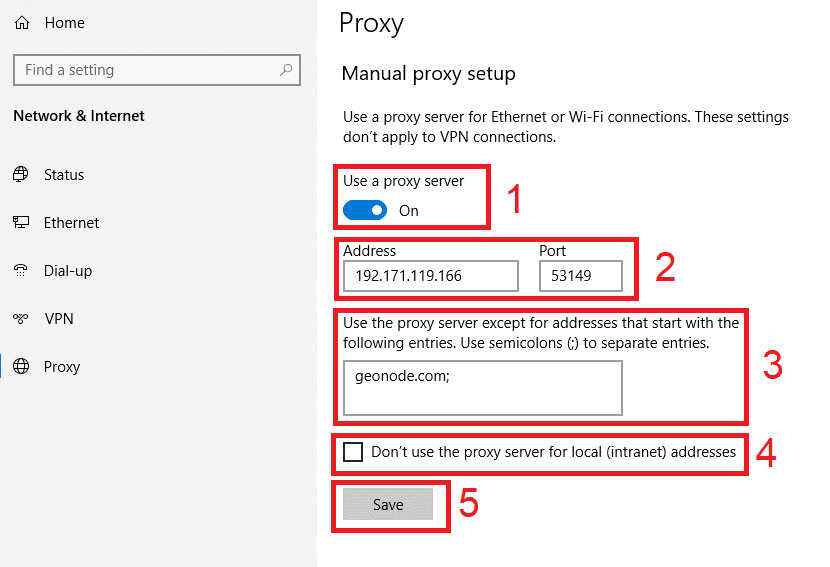
Open Settings > Network & internet > Proxy.
Under Manual proxy setup, click Set up next to Use a proxy server.
Turn on Use a proxy server.
Enter the host in Proxy IP address and the number in Port.
Click Save.
Open facebook.com in Chrome or Edge and enter the proxy username and password when asked.
Check detailed instructions on our blog:
Read the blog postOpen the Geonode What is my IP page in the same browser or on the same phone: it should show the proxy IP and country, not yours.
In Facebook open Accounts Center > Password and security > Where you're logged in. The current session should show the proxy's location; Facebook marks it as approximate, so a nearby city is normal.
Windows: Settings > Network & internet > Proxy > Set up, switch off Use a proxy server, click Save. macOS: in Details > Proxies switch the proxy off and click OK.
iPhone and iPad: Settings > Wi-Fi > info button > Configure Proxy > Off. Android: set Proxy back to None in the Wi-Fi network's Advanced options, or disconnect the proxy client app.