Best for iPhone & iPad
Residential proxies
from $0.27/GB
Sites see a home ISP address. A sticky session holds one IP for up to 24 hours, so you stay signed in
iPhone & iPad works on
Where the proxy applies
Only on the Wi-Fi network you set it on. Each network keeps its own proxy setting, and cellular data never goes through it.
Apps that ignore it
Safari follows the Wi-Fi proxy, and so do apps built on Apple's standard web connections. Apps that open their own network connections (many games, some VoIP apps) can bypass it.
Work iPhones
A company-managed iPhone or iPad can get a global HTTP proxy from device management that applies to all HTTP traffic, not one Wi-Fi network. A personal iPhone has no such switch in Settings.
The Settings app takes HTTP proxies and nothing else. For SOCKS5 you need an app.
| Name | Works In | Auth | Blocking Resistance | Best For | Where To Get |
|---|---|---|---|---|---|
| HTTP proxy (Wi-Fi, Manual) | Settings > Wi-Fi, one network at a time | Username and password after you turn on Authentication, or none | Low. The link to the proxy is plain HTTP, but HTTPS sites stay encrypted inside the tunnel | Safari browsing and location checks on a home or office network | Geonode residential, ISP or datacenter proxies; HTTP entries from the Geonode free list |
| PAC file (Wi-Fi, Automatic) | Settings > Wi-Fi, one network at a time | The Automatic screen has only a URL field, no username or password | Same as the proxy the PAC file points to | Sending only some sites through the proxy, or networks where IT hands out a PAC address | Your network admin, or a PAC file you write and host yourself |
| SOCKS5 or HTTP in Shadowrocket | Shadowrocket app (App Store, installs a VPN configuration); Wi-Fi and cellular | Username and password, or none | Medium for SOCKS5; the app also supports Shadowsocks, VLESS, Trojan and WireGuard servers for stricter networks | SOCKS5 proxies, cellular data, and routing other apps as well as Safari | Geonode residential or ISP proxies; SOCKS5 entries from the Geonode free list |
iOS treats every proxy the same way. The type of IP matters to the sites and apps you open.
from $0.27/GB
Sites see a home ISP address. A sticky session holds one IP for up to 24 hours, so you stay signed in
from $1.25/IP
The address never changes, which suits accounts you always open from the same iPhone
from $0.14/GB
Cheap per GB, but streaming services and social apps flag datacenter ranges more often
Free
Fine for checking that the Wi-Fi fields are right. Entries die within hours
Have the proxy host and port ready, plus a username and password if the proxy uses them. In the Geonode dashboard all four are listed in the proxy configuration for your plan; use the HTTP port in iOS Settings and the SOCKS5 port in Shadowrocket. For Automatic you only need the PAC file URL.
Open Settings and tap Wi-Fi.
Connect to the network you want to use, then tap the info button (i) next to its name.
Scroll to the bottom and tap Configure Proxy under HTTP Proxy.
Select Manual.
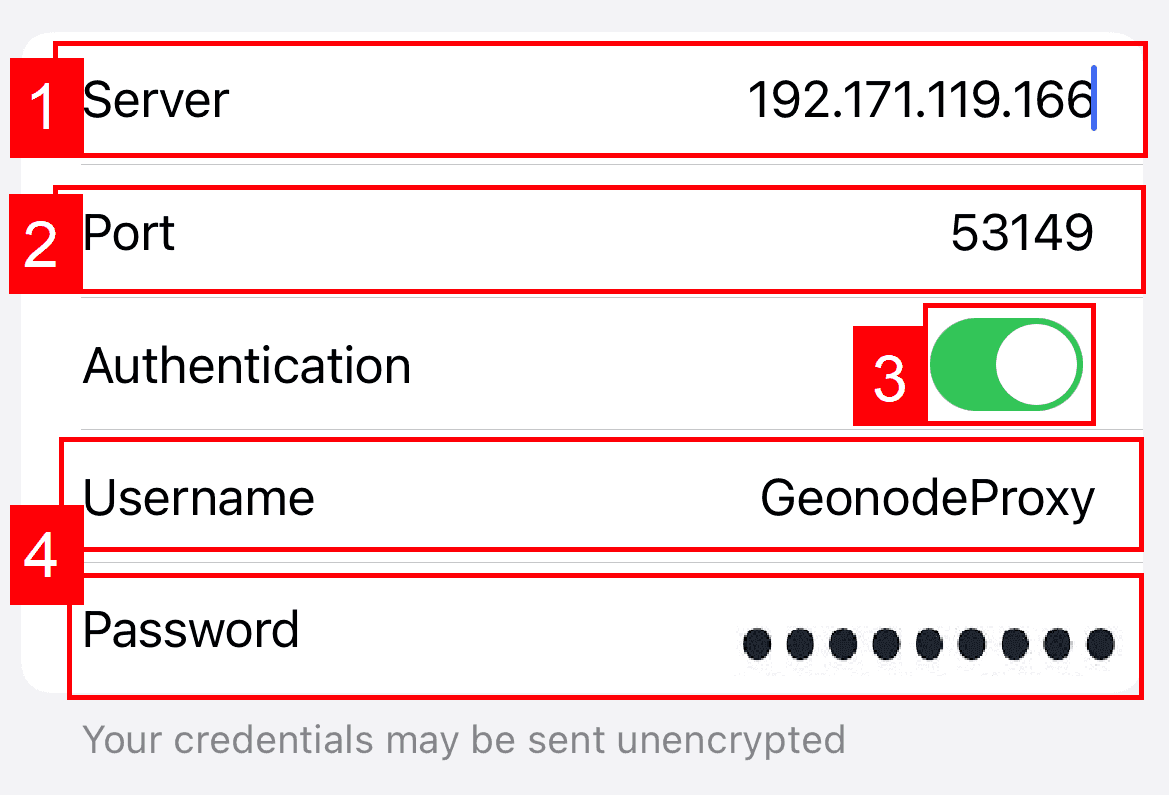
Enter the proxy host in Server and the port in Port.
If the proxy needs a login, turn on Authentication and fill in Username and Password.
Tap Save.
Check detailed instructions on our blog:
Read the blog postOpen geonode.com/what-is-my-ip in Safari. It should show the proxy's IP and country, not your home or carrier address.
With Shadowrocket, load the same page once on Wi-Fi and once on cellular; both should show the proxy IP.
Open the app you set the proxy up for. If it loads but still shows content for your real location, that app does not use the system proxy.
Wi-Fi proxy: go to Settings > Wi-Fi, tap (i) next to the network, tap Configure Proxy, select Off and tap Save.
Shadowrocket: turn off the switch on the Home tab. To remove it completely, delete the Shadowrocket profile under Settings > General > VPN & Device Management > VPN.