Works, costly for downloads
Residential proxies
from $0.27/GB
Residential IPs pass network filters well. The catch is traffic: one game download can use tens of GB.
Steam works on
Proxy settings
Steam has no proxy field. It uses the system proxy: Settings > Network & internet > Proxy on Windows, System Settings > Network > Details > Proxies on Mac.
Store country
Your store country comes from your first purchase. It changes only after you pay with a payment method from the new country, and at most once every 3 months. An IP from another country does not change prices.
Ban risk
Section 3.A of the Steam Subscriber Agreement forbids IP proxying to disguise where you live, including to get region-locked games or regional prices. Valve can close the account for it.
Steam has no proxy field of its own, so the choice is between the system proxy and a tool that routes steam.exe.
| Name | Works In | Auth | Blocking Resistance | Best For | Where To Get |
|---|---|---|---|---|---|
| Windows system proxy (HTTP) | Steam's web pages (Store, Community) and game downloads. Parts of the client may connect directly | No username or password fields in the Windows dialog | Low: the network sees the proxy host in plain HTTP | Proxies without a login, or with IP whitelisting | Geonode ISP or datacenter proxies; Geonode free list (HTTP) |
| macOS system proxy (HTTP or HTTPS) | Steam's web pages (Store, Community) and game downloads in Steam for Mac. Parts of the client may connect directly | Username and password with the Proxy server requires password toggle. We haven't confirmed that Steam picks up the saved password, so IP whitelisting is the safer choice | Low | Mac users with a whitelisted IP. macOS also has a SOCKS proxy field, but we haven't confirmed Steam uses it; for SOCKS5 on a Mac, use Proxifier for Mac | Geonode ISP or datacenter proxies |
| SOCKS5 through Proxifier (Windows) | Every TCP connection from steam.exe and steamwebhelper.exe; other apps stay direct | Username and password | Medium: the SOCKS5 handshake is unencrypted, so a network filter can spot it | Networks that block Steam login, and authenticated SOCKS5 proxies | Geonode residential, ISP or datacenter proxies; Geonode free list (SOCKS5) |
Most people put Steam behind a proxy to reach it from a school or office network, or to sign in from one fixed IP. Game downloads go through the same proxy, so speed and traffic volume count for more than they do with a chat or browser app.
from $0.27/GB
Residential IPs pass network filters well. The catch is traffic: one game download can use tens of GB.
from $1.25/IP
The IP is static and comes from a consumer ISP range, so Steam sees the same address at every login. Downloads run at datacenter speed.
from $0.14/GB
Fast and cheap for large game downloads. Rotating datacenter IPs change between sessions, so pick ISP if you want Steam to see one address.
Free
Public proxies are shared and slow, and whoever runs one can see unencrypted traffic. Don't sign in to Steam through them.
Close Steam fully before you change the proxy, then start it again so it picks up the new setting.
Quit Steam from the tray icon (right-click it and choose Exit Steam).
Open Settings > Network & internet > Proxy.
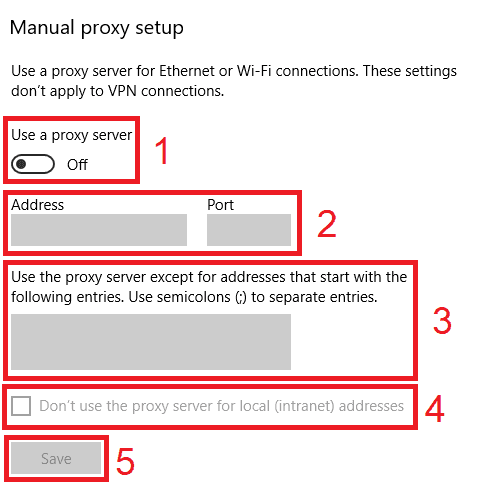
Under Manual proxy setup, click Set up next to Use a proxy server.
Turn on Use a proxy server.
Enter the proxy host in Proxy IP address and the port in Port.
Tick Don't use the proxy server for local (intranet) addresses, then click Save.
Start Steam.
Check detailed instructions on our blog:
Read the blog postOpen Geonode's What is my IP page in Edge or Safari. It should show the proxy's IP and country, which confirms the system proxy itself works.
Paste steam://openurl/https://geonode.com/what-is-my-ip into the Windows Run dialog (Win+R) or a browser address bar. The page opens in Steam's built-in browser and should show the proxy's IP, not your own.
In Proxifier, watch the Connections list while Steam starts. Lines for steam.exe should name your proxy, not Direct.
Windows: open Settings > Network & internet > Proxy, click Edit next to Use a proxy server and turn it off. macOS: turn off Web proxy (HTTP) and Secure web proxy (HTTPS) under Details > Proxies.
Proxifier: set the Steam rule's Action to Direct, or quit Proxifier.
Restart Steam so it drops the old connection.