Best for YouTube
Residential proxies
from $0.27/GB
The IPs come from home ISPs in the country you pick, so YouTube serves the page a local viewer sees. Sticky sessions hold one IP for up to 24 hours, long enough for a whole watch session.
YouTube works on
Built-in proxy setting
None. youtube.com and the YouTube apps have no proxy field, so the proxy goes into the operating system, the browser or a proxy client app.
How YouTube knows your country
It uses your IP address, addresses saved in your Google account and, on phones with location access on, the device location. A proxy changes only the IP, so turn off location access for YouTube on a phone if the country matters.
Terms of Service
YouTube's Terms ban access by robots, botnets or scrapers and any attempt to inflate views, likes or subscribers. The Premium help page says a subscription may be cancelled if you misrepresent your location, for example with a VPN.
Pick the method by where you watch. Desktop browsers follow the system proxy or an extension, the Android app needs a proxy client, and scripts take the proxy in code.
| Name | Works In | Auth | Blocking Resistance | Best For | Where To Get |
|---|---|---|---|---|---|
| System proxy (Windows, macOS, iPhone Wi-Fi) | youtube.com in Chrome, Edge and Safari, which follow the system proxy | Windows has no credential fields, so the browser asks for them; macOS and iPhone have a password toggle | Same as the IP behind it | Watching on your own computer | Geonode residential or ISP proxies |
| Browser extension (for example Proxy SwitchyOmega) | Only the browser it is installed in | HTTP or SOCKS5; username and password depend on the extension | Same as the IP behind it | Switching countries for YouTube without changing system settings | Geonode residential proxies |
| Proxy client app (Android) | The YouTube app and Chrome on Android; the client routes apps through a local VPN | SOCKS5 or HTTP with username and password. Android's own Wi-Fi proxy setting has no password fields | Same as the IP behind it | The Android app with a password-protected proxy | Geonode residential proxies |
| Proxy in code (Python requests, Puppeteer) | Scripts that load public YouTube pages | http://USERNAME:PASSWORD@host:port in the proxy URL | Residential IPs; use sticky sessions for multi-page sequences and throttle requests | Ad verification and checking trending pages by country | Geonode rotating residential proxies |
Users report that YouTube shows the 'Sign in to confirm you're not a bot' check more often on shared, datacenter and VPN IPs than on home connections. YouTube has not published a rule on this.
from $0.27/GB
The IPs come from home ISPs in the country you pick, so YouTube serves the page a local viewer sees. Sticky sessions hold one IP for up to 24 hours, long enough for a whole watch session.
from $1.25/IP
The IP never changes, so a signed-in Google account shows the same country every day.
from $0.14/GB
Hosting IP ranges are public, so YouTube can tell the traffic comes from a server, not a home connection.
Free
Many people share each one, so it is often flagged already, and many stop working within hours.
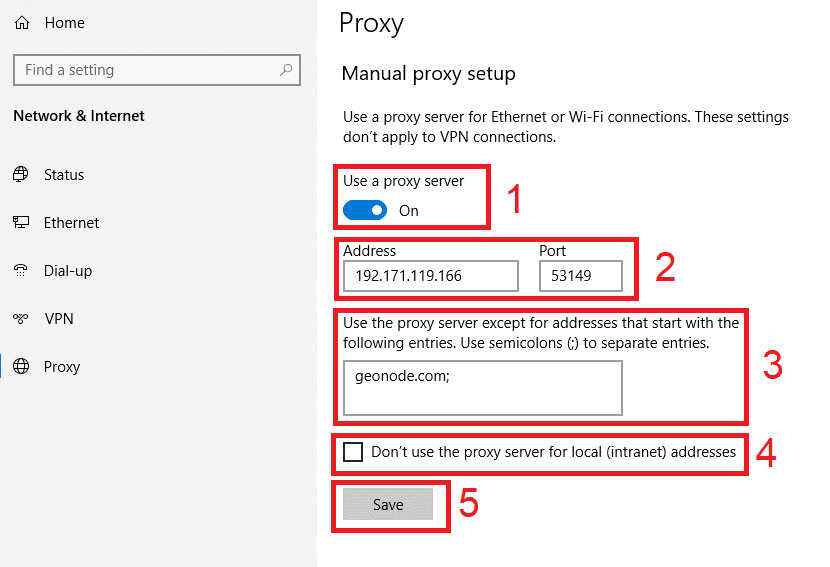
Copy the proxy host (hostname or IP), port, username and password from your Geonode dashboard before you start.
Open Settings > Network & internet > Proxy.
Under Manual proxy setup, click Set up next to Use a proxy server.
Turn on Use a proxy server.
Enter the host in Proxy IP address and the number in Port.
Click Save.
Open youtube.com in Chrome or Edge and enter the proxy username and password when the browser asks.
Check detailed instructions on our blog:
Read the blog postOpen Geonode's What is my IP page in the same browser or on the same phone; it should show the proxy IP and country.
On youtube.com, click your profile picture > Location (in the app, Settings > Location). If you have not set it by hand, it should show the proxy country.
Play a video at 1080p for a minute. If it starts quickly and doesn't stall, the proxy is fast enough.
Windows: in Settings > Network & internet > Proxy, click Edit next to Use a proxy server and switch it off. macOS: switch off the proxy under Details > Proxies. iPhone: set Configure Proxy back to Off.
Android: tap Disconnect in the proxy client app, then force-stop YouTube so it opens a new connection.