Best for Microsoft Edge
Residential proxies
from $0.27/GB
Sites treat residential IPs as home users, and sticky sessions up to 24 hours keep one IP while you stay logged in.
Microsoft Edge works on
Own proxy field
None. Settings > System and performance > Open your computer's proxy settings only opens the Windows or macOS proxy screen, so a proxy set there also applies to other apps that use the system proxy.
SOCKS5 with a login
Not supported. Edge runs on Chromium, which can't send a SOCKS5 username and password, so SOCKS5 works in Edge only without a login.
Proxy per profile
The system proxy and the --proxy-server flag apply to every Edge profile at once. Extensions are installed per profile, so use a proxy extension if each profile needs its own IP.
The methods differ in scope. A system proxy covers the whole device, the flag covers Edge only, and an extension can cover a single profile.
| Name | Works In | Auth | Blocking Resistance | Best For | Where To Get |
|---|---|---|---|---|---|
| System proxy | Edge on every platform, plus other apps that follow the system proxy | HTTP and HTTPS: Edge shows a sign-in dialog | Depends on the IP type you buy | One proxy for the browser and the rest of the device | Geonode residential, ISP or datacenter proxies; Geonode free list |
| --proxy-server flag | Edge desktop (Windows, macOS, Linux) | HTTP and HTTPS: sign-in dialog. SOCKS5: no login | Depends on the IP type you buy | Edge alone on a proxy while other apps connect directly | Geonode residential, ISP or datacenter proxies; Geonode free list |
| Proxy extension | Edge desktop, from Edge Add-ons or the Chrome Web Store | HTTP and HTTPS: stored in the extension. SOCKS5: no login | Depends on the IP type you buy | Switching between proxies in one click from the toolbar | Geonode residential or ISP proxies |
Edge works with any proxy type. Whether an IP gets blocked depends on the sites you open.
from $0.27/GB
Sites treat residential IPs as home users, and sticky sessions up to 24 hours keep one IP while you stay logged in.
from $1.25/IP
The IP stays the same every day, so sites that remember your login location don't ask you to verify it again.
from $0.14/GB
Fast enough for loading pages and testing an Edge setup, but sites with bot protection show more CAPTCHAs on datacenter ranges than on residential IPs.
Free
Enough to check that Edge picks up the setting. Most public proxies on the list are HTTP or SOCKS without a login, so they work with --proxy-server. Don't sign in to any account through one.
You need the proxy host (hostname or IP), the port, and the username and password if your proxy requires a login.
In Edge, click the three-dot menu at the top right and choose Settings. Typing proxy in the Settings search box also finds the link.
Click System and performance. Under System, click Open your computer's proxy settings. Windows opens Network & internet > Proxy.
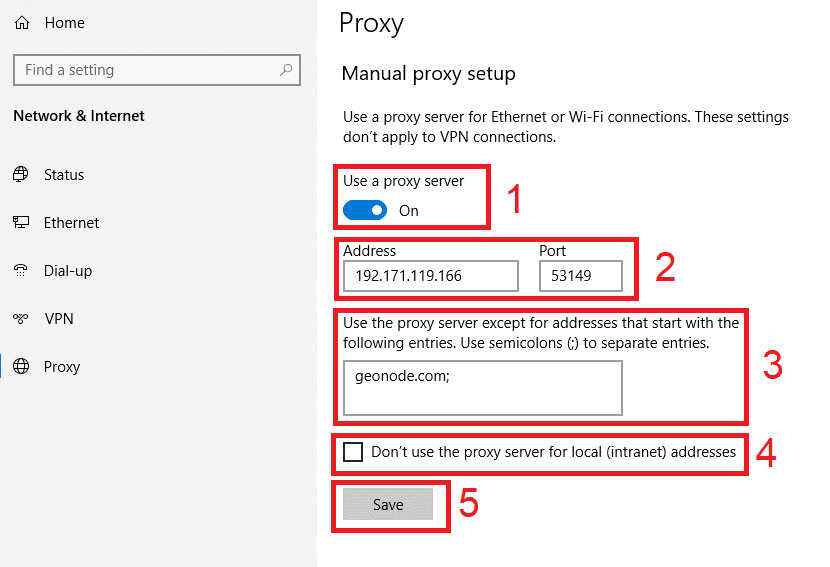
Under Manual proxy setup, click Set up next to Use a proxy server. On Windows 10 there is no Set up button: turn on Use a proxy server on the page itself.
Turn on Use a proxy server.
Enter the host in Proxy IP address and the port in Port.
Optional: list sites that should skip the proxy in the exceptions box, separated by semicolons.
Click Save.
Optional, for a PAC file: under Automatic proxy setup, turn on Use setup script, paste the script address and click Save.
Open any site in Edge and enter the proxy username and password when the sign-in dialog appears.
Check detailed instructions on our blog:
Read the blog postOpen the Geonode What is my IP page in Edge. It should show the proxy's IP and country instead of yours.
If you used the --proxy-server flag or an extension, open the same page in another browser. Only Edge should show the proxy IP.
If the IP doesn't change, open edge://net-internals/#proxy to see the proxy settings Edge is actually using. If they differ from what you entered, check edge://policy.
Windows: open Network & internet > Proxy, click Edit next to Use a proxy server, switch it off and click Save. macOS: in Network > Details > Proxies, turn off each proxy and click OK.
Command line: close all Edge windows and start Edge from its normal shortcut.
Extension: switch it to direct mode, or turn it off in edge://extensions.